Standard catalog ads have a design problem nobody chose. The automation pulls whatever image sits in your product feed - usually a white-background photo shot for a product page - and serves it as advertising. Accurate, scalable, and indistinguishable from every competitor running the same setup.
Enriched catalog ads fix that layer. The product data stays automated; the creative gets designed. Prices, discounts, badges, brand colors, and campaign backgrounds render into every product image - generated from the feed, not edited by hand.
This guide covers what enrichment actually is, when it pays off, what it looks like in practice, and how to implement it without touching your website images. It builds on what catalog ads are and the broader catalog ad design playbook.

What are enriched catalog ads?
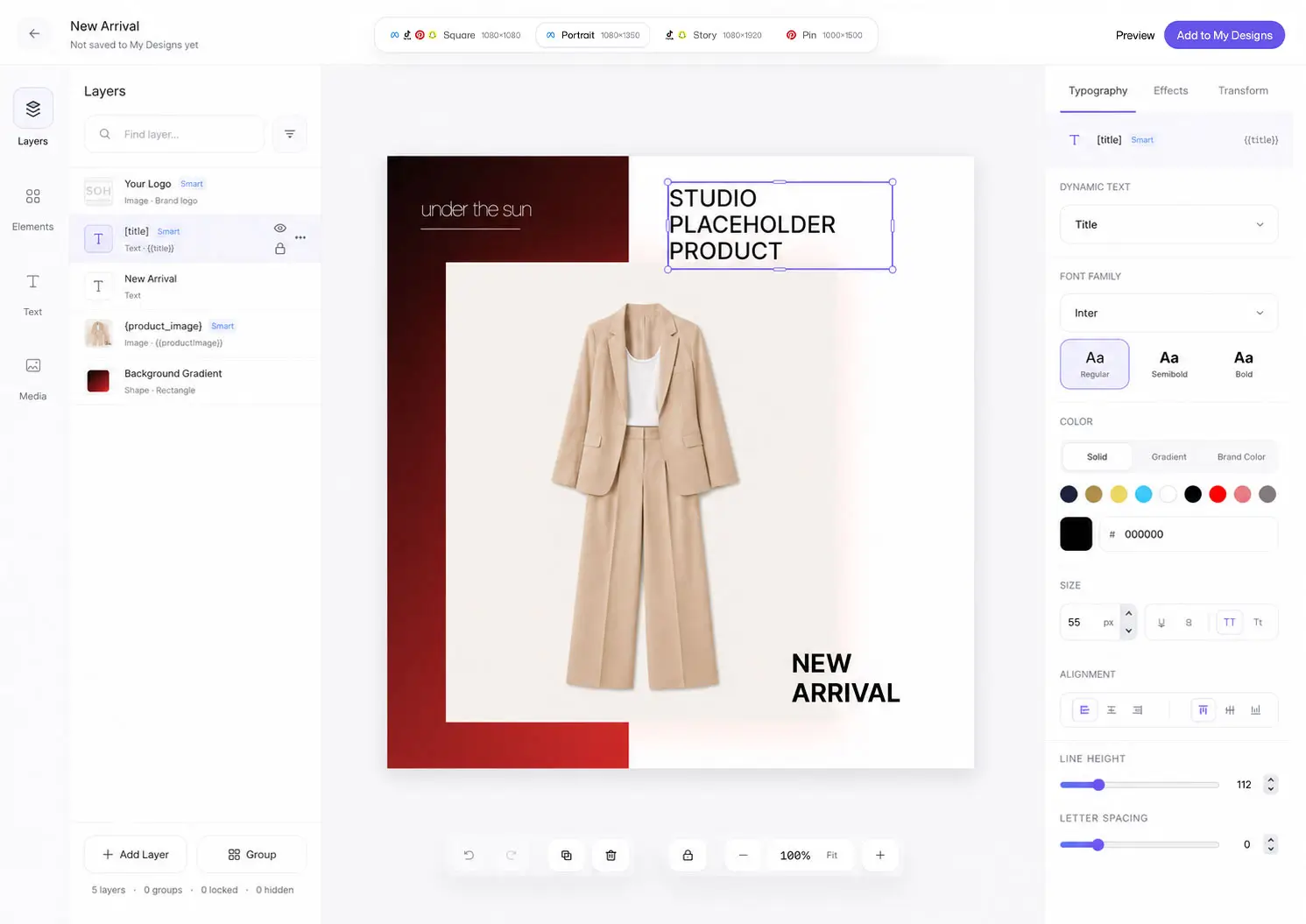
Enriched catalog ads are dynamic product ads whose creative is generated from a template instead of served raw. The template defines a layout - product cutout, price placement, badge logic, background, typography - and every product in the catalog renders through it automatically.
The key property: enrichment is data-driven. The price on the creative is the price field. The discount badge computes from price and sale_price. The "bestseller" tag fires from a label in the feed. Nothing is manually placed per product, which is why it works at 400 products or 40,000.
That distinguishes enrichment from two things it's often confused with:
Manual creative - designing individual product ads. Beautiful, and dead past fifty products.
Native overlays - the platform-rendered price stickers Meta offers. Automated, but generic: limited layouts, no brand system, the same look every advertiser gets.
Enrichment sits between: automated like overlays, designed like manual work.
Where raw feed images can limit the ad
Three structural reasons, none of them fixable by better photography:
Product-page images answer product-page questions. On a white background, at catalog scale, they communicate "here is the object" - not the price, not the offer, not the brand. In a feed, the ad has half a second to answer "why stop?", and the image carries none of the answer.
Everyone's automation looks the same. Dynamic campaigns across an industry pull from similar catalogs with similar photography. When creative is identical, price is the only differentiator left - a race you don't want to win.
The information buyers act on lives outside the image. In Salsify's 2025 research, 71% of shoppers said they have returned products because of incorrect product content - and in a catalog ad, the image carries nearly all of that content.
Meta's own platform direction agrees: its Advantage+ systems increasingly treat creative as the main performance lever, because targeting is automated for everyone equally.
What enrichment looks like
Concretely: the price rendered in brand typography, a strikethrough with the sale price beside it, a computed "-30%" badge that appears only where true, a brand frame, and campaign backgrounds behind the product cutout. Feed-driven elements stay accurate only when the source fields, rules, and refresh schedule are accurate, so validate the rendered output before publishing.
The full pattern catalog - which elements to use when, with the specs per platform and format - is in catalog ad design. This article stays on the enrichment layer itself: how it works, how to implement it, and how to measure it.
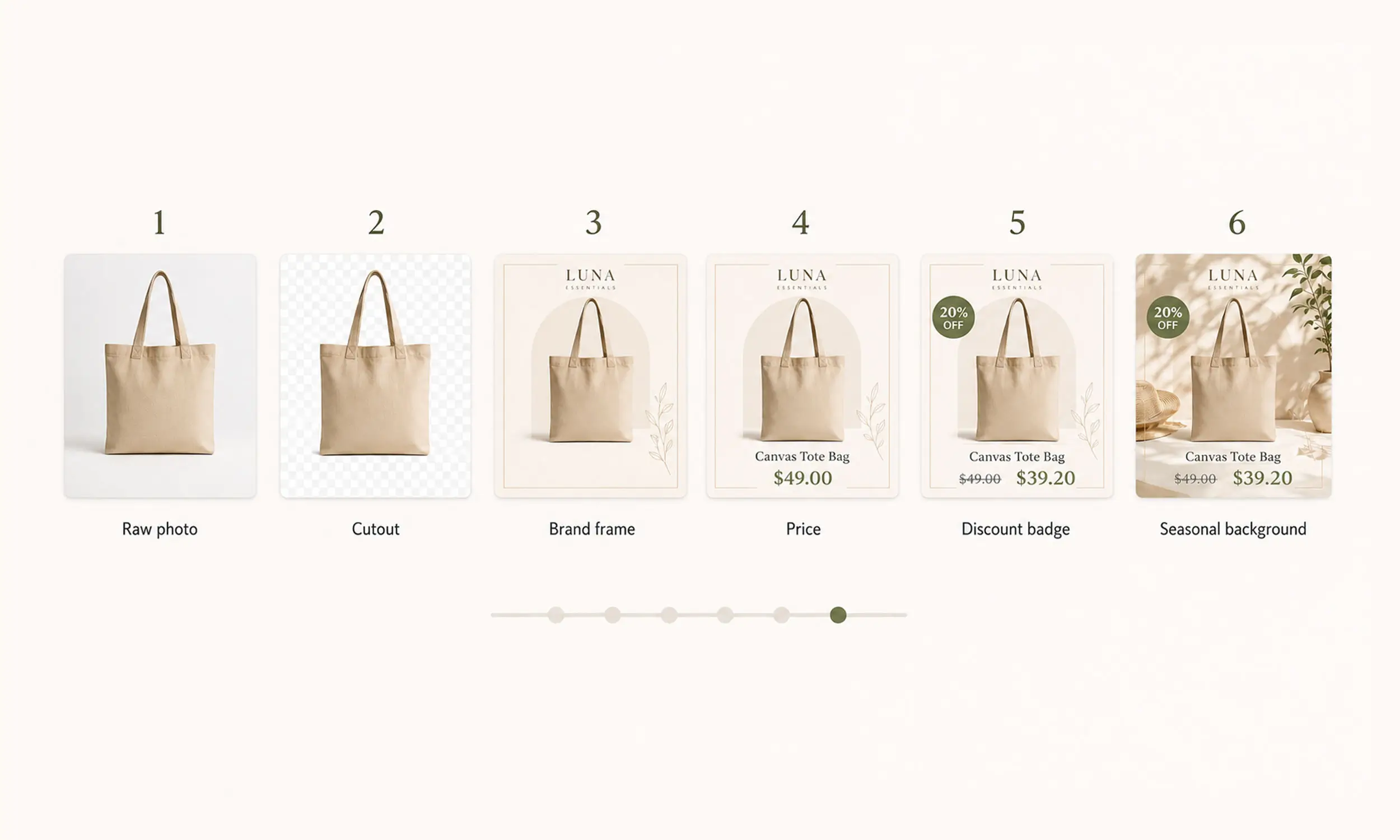
One platform caveat: enrichment belongs on Meta, TikTok, Snapchat and Pinterest. Google Shopping disapproves images with promotional overlays - keep a clean image pipeline for Google, and enrich everywhere else.
The implementation that scales
The wrong way first: editing images and re-uploading them to the feed. It breaks on the first price change, pollutes your Google pipeline, and turns every sale into a design sprint.
The right way is a rendering layer between your catalog and your ad platforms:
Import the catalog - products, prices, labels - from Meta or a CSV/XML feed
Design templates once: layout, price and badge layers, backgrounds, per-ratio variants
Render creative for every product automatically, to new image URLs
Serve the enriched images to ad platforms while your website photography stays untouched
Re-render on data changes - price drops, new sale, season flip - without touching the design
Because rendered creative gets versioned URLs, you also avoid Meta's stale-image replacement issue; its documented workflow is to use a new URL when the asset changes (details).
This is exactly the workflow behind the case studies on this blog: Moeto Detstvo ran promotional creatives across 15+ collections and 400+ products from one design system, and Paolo Botticelli kept Summer Sale creative consistent across 4,000+ products - campaigns whose creative volume would be impossible manually.
When enrichment pays off most
Enrichment is most worth testing in four situations:
Promotions and sales - the discount is the message, and raw photos can't carry it. Strikethrough pricing and sale badges across the catalog, on and off with the campaign.
Competitive categories - fashion, beauty, home: feeds full of similar products where a brand frame can create visual distinction. Under The Sun's 1,500+ product catalog is the reference story.
Ad fatigue - when frequency climbs and CTR decays, rotating the template refreshes every product's creative at once.
Vertical placements - Reels, Stories, and TikTok need purpose-built vertical layouts when important content would be lost in an automatic crop.
Measuring it
Enrichment is testable like any creative change, and you should test it rather than trust it:
Split one product set into two ad sets: raw feed images vs enriched templates
Hold budget, audience, and placements equal
Read CTR first (the direct measure of the creative's job), then ROAS over a full conversion window
Iterate the template, not individual ads - one variable per test
Track frequency alongside: enriched creative that wins at frequency 2 may still need a template rotation at frequency 5.
Making enrichment a repeatable catalog layer
Flow is the enrichment layer described in this article: the catalog supplies the facts, while the creative studio applies reusable templates, brand assets, backgrounds, and variations around them. Synchronized product updates keep the creative workflow tied to the source data instead of to manually edited files.
Start with one restrained treatment on a defined product set. Review the supported field bindings and formats, then compare that render with raw-image creative under the same audience, objective, and measurement window. The test - not the feature list - decides whether enrichment earns a wider rollout.
FAQ
What are enriched catalog ads?
Dynamic product ads whose creative is generated through a design template - prices, discounts, badges, and brand elements rendered onto every product automatically from feed data, instead of serving raw product photos.
Do enriched catalog ads work on every platform?
Meta, TikTok, Snapchat and Pinterest reward them. Google Shopping is the exception - promotional overlays get products disapproved there, so keep a separate clean-image pipeline for Google.
Do I need to change my website images?
No, that's the point. Enrichment renders separate ad creative to new URLs; your store photography and your Google feed stay untouched.
Is this the same as Meta's overlays?
Same idea, different ceiling. Meta's native overlays add basic price stickers in fixed styles. Template enrichment gives you full layout control - brand system, badges, backgrounds, per-ratio design - still fully automated.
How do prices stay accurate on the creative?
The rendered price is the feed's price field. When the feed updates, creative re-renders. Keep sale prices in sale_price and the strikethrough logic follows automatically.
Final thoughts
Catalog automation solved distribution and left creative behind - that's the gap enriched catalog ads close. The feed still runs everything; it just renders through a design system on the way to the ad platform.
The brands doing this well treat it as infrastructure, not as a campaign task: templates built once, connected to the catalog, refreshed by rotation. Every product ships with the price, the offer, and the brand in the creative itself - at whatever scale the catalog grows to.


Join The Newsletter
Stay ahead in catalog advertising
Get practical guides, product updates, new templates, and best practices for Dynamic Product Ads, creative automation, and ecommerce marketing.
On this page
Related articles



Launch catalog ads with ease
Ready to launch better catalog ads?
Turn product catalogs into publishing-ready creatives in minutes.