Snapchat's catalog diagnostics use a severity model, explicit media error codes, and a downloadable report. A separate troubleshooting layer matters too: delivery gates can stop Dynamic Ads without turning a feed-diagnostics row red.
This guide covers both layers: every documented error class with its fix, and the invisible gates to check when diagnostics look clean. It's the Snapchat spoke of the product feed errors pillar; the feed spec itself is in Snapchat product feed.
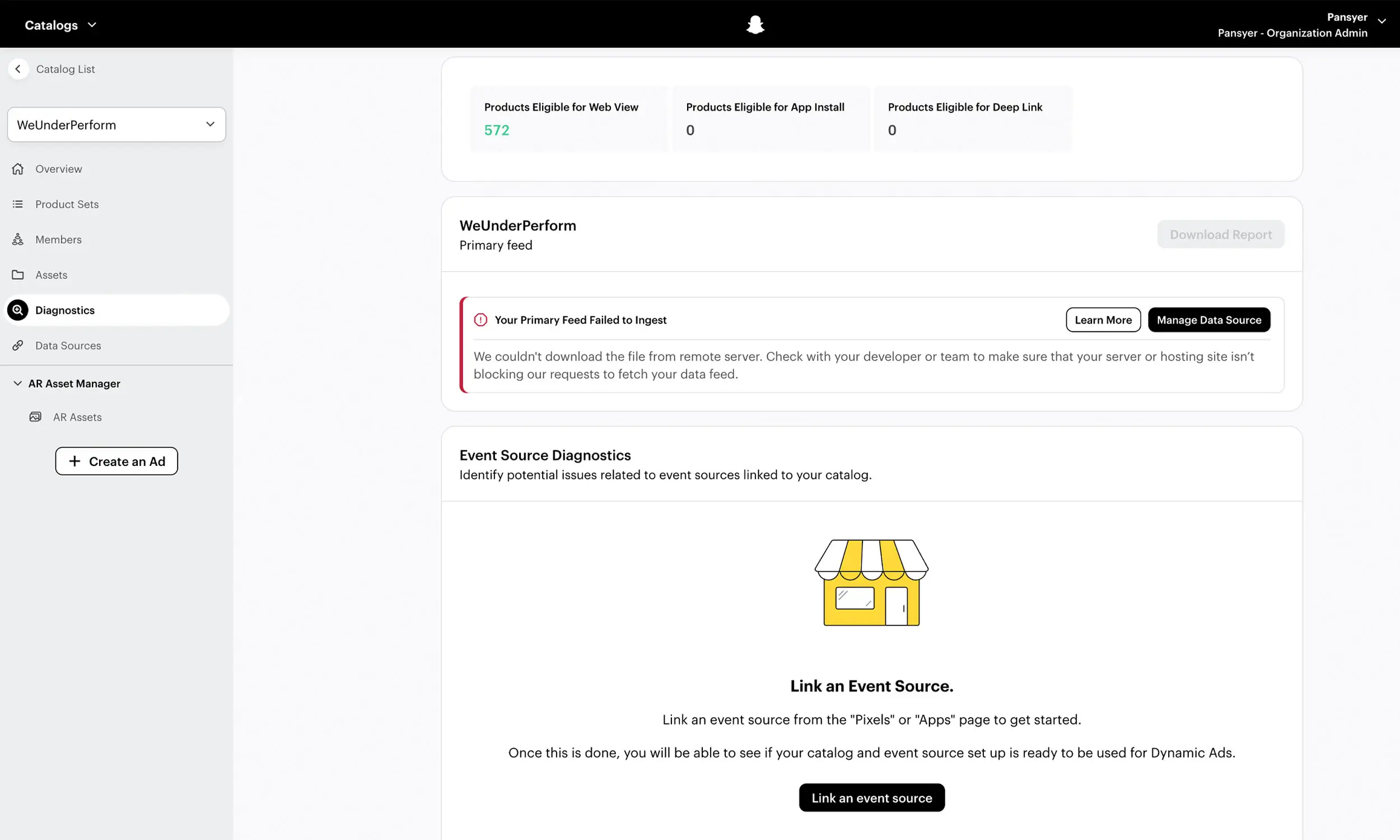
The severity model: errors, warnings, information
Snapchat's Catalog Diagnostics sorts problems into three tiers, and triage follows the tiers:
Errors - a required field is missing or invalid; the product doesn't upload. These block revenue; fix them first.
Warnings - an optional field is missing or malformed; the product serves anyway, with reduced matching or features. Schedule these; don't firefight them.
Information flags - eligibility notes, mostly for app advertisers: products missing app fields (store IDs, deeplink URLs) are flagged ineligible for App Install and Deep Link ad units without being broken for web campaigns.
The downloadable Error Report lists feed errors by product ID - useful for spreadsheet triage, with one crucial caveat covered below.
Required-field errors
Snapchat requires seven fields plus one identifier: id, title, description, link, image_link, availability, price - and at least one of brand, GTIN, or MPN.
The failure patterns:
Missing required field - the row blocks. Note the identifier rule is one-of-three: an identifier error means all three are absent, or the GTIN you sent is invalid. An empty
brandwith a validgtinis fine.Price format -
199 USDstyle; a null price blocks the product.ID rules - unique, max 128 characters, and stable: the
idis also the retargeting join key, so regenerating IDs between exports silently breaks your audiences even when diagnostics stay green.Availability values - five supported (
In stock,Out of stock,Preorder,Discontinued,Available for order); out-of-stock products are excluded from ads automatically, which is behavior, not breakage.
Media errors: the codes and the blind spot
First, the blind spot: image failures are not included in the downloadable feed Error Report. A catalog can report zero feed errors while some images fail - the product still builds, and only successfully fetched images serve. Check the media diagnostics surface separately as part of each catalog review.
The documented codes and their fixes:
AUTH_ERROR- your server or CDN is rejecting Snap's fetcher. Whitelist Snapchat's user agent/IPs; bot-protection rules are the usual culprit.REQUEST_TIMED_OUT- the image host is too slow or rate-limiting. Serve catalog images from a real CDN.NOT_FOUND- broken URL; the image moved or the URL was mistyped in the feed.UNSUPPORTED_MEDIA- outside WebP, JPEG, or PNG. Convert to a supported format.CONTENT_TOO_LARGE- over 5 MB. Compress; a 1000-1500px JPEG lands far under the cap.SERVER_ERROR- your host errored; if it recurs, it's a hosting problem, not a Snapchat one.
Baseline requirements are gentle - 200 x 200 minimum - but ship the same 1000px+ renders you use everywhere; the creative bar is set by the feed you're competing in, not the floor the platform accepts.
Code | Cause | Fix |
|---|---|---|
| Snapchat could not access the image because the image host requires authorization or denied the request. CDN, firewall, or bot-protection rules can cause this. | Make the image publicly accessible and check CDN, firewall, hotlink-protection, and bot-protection rules. |
| Snapchat timed out while trying to retrieve the image. A slow origin, CDN issue, or rate limiting may be responsible. | Serve images from a reliable CDN and check response times and rate limits. |
| The image URL could not be found, typically because it is broken, moved, or returns a 404. | Correct the URL and verify that it returns the image publicly. |
| Snapchat could not process the image format. Product catalog images must be WebP, JPEG, or PNG; GIF is not supported. | Convert the image to WebP, JPEG, or PNG and ensure the server returns the correct content type. |
| Snapchat considers the retrieved media too large to process. | Reduce/compress the image file size. Avoid stating a specific 5 MB limit for |
| An error occurred while Snapchat was retrieving or processing the image; this may involve the image host or the ingestion service. | Verify the image URL returns a successful response consistently, check hosting/CDN errors, and retry ingestion. |
The delivery gates that look like errors
When diagnostics are clean and Dynamic Ads still don't deliver, check these three documented gates early:
The 1,000-Snapchatter threshold - Dynamic Ads require your Snap Pixel events to match at least 1,000 Snapchatters. New pixels and low-traffic stores sit below the line; no feed fix changes that - traffic and correct pixel implementation do.
item_ids mismatch - pixel events (Page View, View Content, Add to Cart, Purchase) must pass
item_idsthat exactly match catalogidvalues. When they don't, retargeting quietly starves. Verify the values, not the events: firing without matching IDs looks healthy everywhere except results.Out-of-stock exclusion - products marked out of stock don't serve; a stale feed that never flips them back keeps them invisible. Sync discipline is the fix - Snapchat supports hourly scheduled fetches.
The Snapchat prevention checklist
Validate the seven required fields plus one identifier before upload
Keep IDs stable across exports - they're audience keys, not just row keys
Serve images as WebP, JPEG, or PNG under 5 MB from a CDN that doesn't block Snap's fetcher
Check media diagnostics separately every week - the error report won't warn you
Verify pixel
item_idsagainst catalog IDs after any site or app changeUse hourly scheduled sync during sales; daily as the floor
Gzip large feeds (.zip isn't supported); CSV/TSV/TXT/XML over HTTPS or SFTP
For app campaigns, fill the app field set or expect eligibility flags
Separating Snapchat feed checks from delivery gates
Snapchat troubleshooting has the same split as this guide: mechanical catalog checks upstream, delivery gates inside the platform. Flow can validate feed data before export, while its Snapchat workflow supports reusable templates and product variations for the creative side.
Validate the exported files against Snapchat's current field and media limits, then switch tools. Media diagnostics, pixel item_ids, the 1,000-Snapchatter threshold, stock status, account state, and campaign configuration can only be confirmed on Snapchat's side.
FAQ
Why aren't my Snapchat Dynamic Ads delivering if my catalog has no errors?
Check the gates: pixel events matching fewer than 1,000 Snapchatters, item_ids that don't match catalog IDs, or products sitting in out-of-stock status. None of these produce a feed error.
Why do some product images not show on Snapchat?
Image fetch failures - and they don't appear in the feed error report. Check media diagnostics for codes like AUTH_ERROR (your CDN blocking Snap), UNSUPPORTED_MEDIA (outside WebP/JPEG/PNG), or CONTENT_TOO_LARGE (over 5 MB).
What identifier does Snapchat require?
Any one of brand, GTIN, or MPN - looser than Meta's brand requirement. An identifier error means all three are missing or the GTIN is invalid.
What's the difference between errors and warnings in Snapchat diagnostics?
Errors are required-field problems that block the product from uploading; warnings are optional-field gaps that reduce matching but don't stop serving. Fix errors immediately, batch the warnings.
How often can Snapchat sync my feed?
Scheduled fetches can run hourly or daily over supported transfer methods. Hourly fetches are worth evaluating during short promotions or rapid inventory change.
Final thoughts
Snapchat splits catalog health into two honest halves: a diagnostics system that tells you exactly what's wrong with the data, and a set of delivery gates that tell you nothing at all. Automate the first half, memorize the second - threshold, item_ids, stock status - and "why aren't our Snap ads running" becomes a sixty-second check instead of an afternoon.


Join The Newsletter
Stay ahead in catalog advertising
Get practical guides, product updates, new templates, and best practices for Dynamic Product Ads, creative automation, and ecommerce marketing.
On this page
Related articles



Launch catalog ads with ease
Ready to launch better catalog ads?
Turn product catalogs into publishing-ready creatives in minutes.