Pinterest provides numbered catalog error codes with documented meanings and fixes. Troubleshooting also needs lifecycle checks - ingestion cadence, manual-upload expiry, and domain claims can affect serving without appearing as an item-level data error.
This guide covers both: every code you'll actually meet, and the non-error failures around them. It's the Pinterest spoke of the cross-platform product feed errors pillar; the field-by-field spec lives in Pinterest product feed.
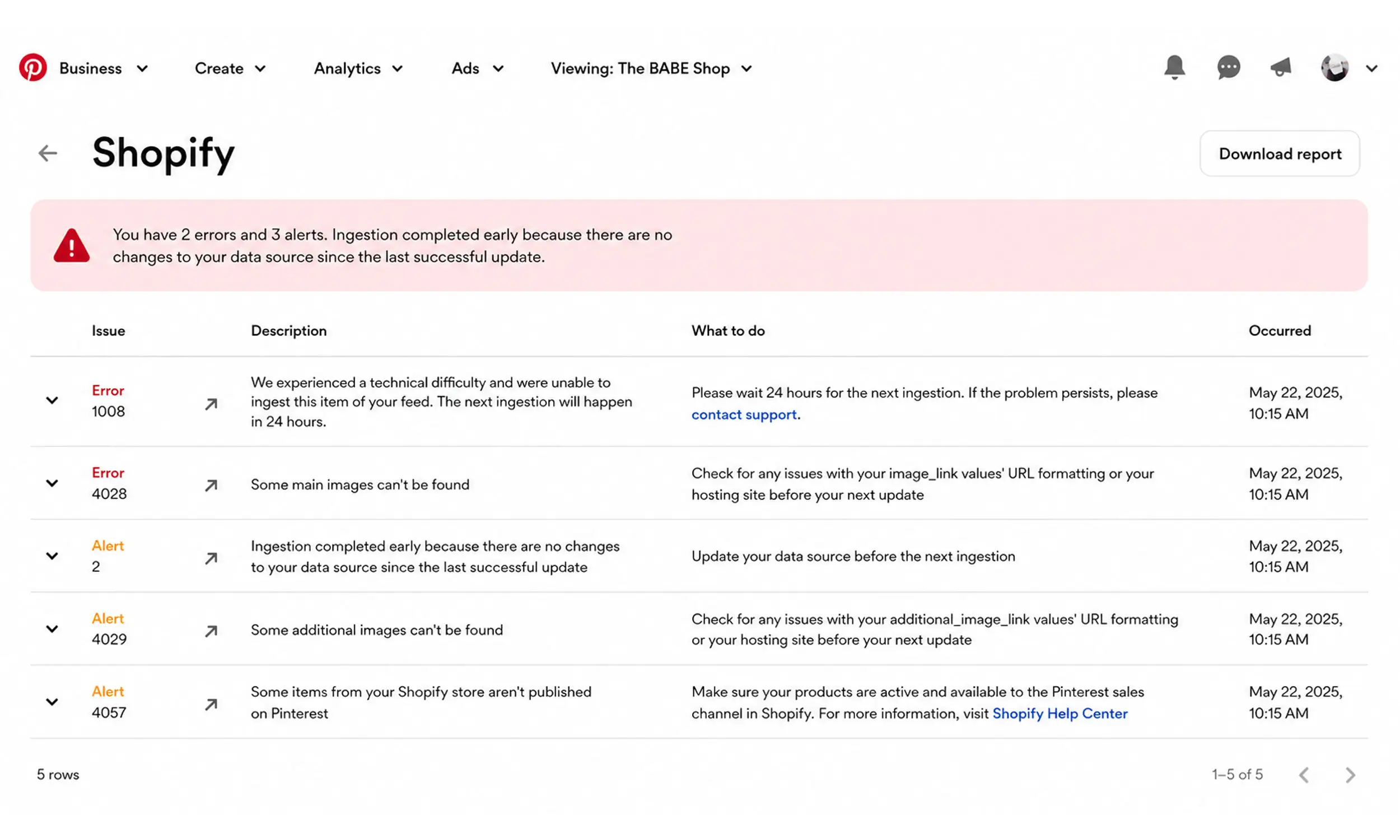
Where Pinterest reports problems
Ads Manager → Catalogs → your data source → Diagnostics shows ingestion status and item-level issues, keyed to numbered error codes. Two habits make it useful:
Check ingestion status first - a failed ingestion means item-level counts are stale, and you're debugging yesterday's feed
Sort by code, fix by class - one cause (say, a malformed export) usually produces one code across hundreds of items; you're fixing causes, not rows
Whole-feed codes: nothing got in
Error 100 - the data source couldn't be downloaded. The URL moved, requires auth Pinterest doesn't support, or your host is blocking the fetch. Remember Pinterest's constraints: no password-protected files, no Dropbox links.
Error 152 - too few lines. Your export produced a near-empty file; the bug is in generation, not ingestion.
Error 143 - malformed XML. Validate the file; a single unescaped character can kill an RSS feed.
Error 129 - duplicate column headers. Usually a hand-edited CSV or a template merge gone wrong.
These block everything downstream. If you see one, ignore every item-level count until it's cleared.
Required-field and format codes
Errors 106 / 107 / 111 / 112 - missing title, description, image_link, or availability. Pinterest requires seven fields; missing ones can fail ingestion rather than just skipping the row, which is why validation before upload matters more here than on platforms that degrade gracefully.
Error 113 - price formatting. Number plus ISO currency code, no symbols, no comma decimals.
Error 179 - invalid GTIN. Fix or remove; an empty identifier field is fine on Pinterest (brand and GTIN are optional), a wrong one is not.
Item-level codes: the Pinterest-specific ones
Error 123 - duplicate items. The same
idappears on multiple rows; check variant flattening and youritem_group_idstructure.Error 139 - product link doesn't match your claimed domain. Pinterest's signature rule: every
linkmust live on the website you verified. Common triggers: links through redirect domains, tracking subdomains you never claimed, or a rebrand that moved the store. Claim the domain or fix the links - there's no exemption.Errors 1001 / 1007 - image not found or invalid. URLs must resolve directly to the file; check CDN rules and remember additional images only need 75 x 75, but your main images should be 2:3 at 1000 x 1500.
The failures that aren't errors
This is the section that saves Pinterest advertisers the most confusion:
The daily ingestion lag - hosted feeds ingest once every 24 hours, no on-demand refresh. A price change at 9am may not reflect until tomorrow. That's not a bug; time your promotions around it.
Manual upload decay - manually uploaded feeds need re-uploading every 7 days for organic distribution and stop serving ads entirely after 90 days. "Our products vanished from Pinterest" is very often a forgotten manual upload hitting its cliff. Host the feed at a URL.
Merchant guideline currency - Pinterest's merchant guidelines expect price and stock current within 7 days, and require visible shipping and return policies. Drift here risks distribution limits rather than error codes.
Error 4042 - the one policy code: a merchant-guidelines violation. Fix the underlying store issue (return policy, availability honesty, prohibited content), then use the one-click appeal.
Looks like an error | Actually is | What to do |
|---|---|---|
Daily ingestion lag | Usually normal ingestion timing. Pinterest says hosted data sources are ingested once every 24 hours. However, Pinterest also currently documents a “Trigger ingestion” option for special/time-sensitive updates, so saying there is no on-demand refresh is too strong. A change made after the scheduled ingestion may otherwise not appear until the next ingestion. (help.pinterest.com) | Plan routine updates around the daily ingestion schedule. For urgent changes, check Data sources → Manage ingestion → Trigger ingestion if that option is available to your account. |
Manual upload decay | Correct, but “expire” is slightly misleading. Manually uploaded feeds need to be updated at least every 7 days; otherwise products stop being organically distributed. After 90 days without an update, they also stop being distributed in ads. The feed itself isn't necessarily “expired” or deleted. (Pinterest Help) | Re-upload the same manual data source at least every 7 days, or host the feed at a URL so Pinterest can ingest updates automatically. |
Merchant guideline freshness | Pinterest requires accurate price and in-stock information that is current within 7 days. It also expects merchants to meet requirements around returns and customer experience; Pinterest's catalog setup documentation specifically calls for easy-to-find shipping and refund policies. Policy problems can affect eligibility/distribution even when the feed's technical formatting is valid. (Pinterest Policy) | Keep price and availability synchronized within 7 days, and make contact, shipping/delivery and return/refund information clear on the site. |
Error 4042 | Merchant Guidelines violation — specifically a row-level failure. Pinterest describes 4042 as products not being published because they don't meet its Merchant Guidelines. This is a policy/eligibility problem rather than a CSV/XML formatting problem. (Pinterest Help) | Review the Merchant Guidelines, correct the affected product or merchant issue, and let it be evaluated on the next ingestion. Appeal only if you believe Pinterest's enforcement decision was incorrect; Pinterest does provide appeals for enforcement decisions, though availability can vary. (Pinterest Policy) |
The health metric worth adopting
Pinterest gives you a built-in feed-quality KPI: the Verified Merchant Program requires at least 75% of catalog products ingesting successfully, alongside steady tag events. Even if the blue badge isn't your goal, that 75% line is a sensible internal floor - a catalog below it has a systemic problem, not item-level noise.
The Pinterest prevention checklist
Host the feed at a URL - never rely on manual uploads past a first test
Validate the seven required fields and price format before upload
Keep every product link on the claimed domain; claim any subdomains links pass through
Serve images at 1000 x 1500 (2:3) from a host that resolves directly
Unique
idper row; variants grouped underitem_group_idTime price changes around the 24-hour ingestion cycle - especially sale starts
Keep shipping and return policy pages visible and current
Watch the ingestion-success rate against the 75% VMP floor
Review diagnostics weekly, sorted by code
Moving Pinterest error prevention upstream
Pinterest's numbered errors make a useful ruleset for preflight. Flow's catalog engine can apply the required mappings and surface catalog-readiness issues before ingestion, while its Pinterest workflow adds reusable templates and creative review.
That can prevent many file and item-level problems, but it cannot claim a domain or resolve policy state on your behalf. Validate the exported dimensions and fields, then use Pinterest diagnostics for the final codes, ingestion rate, domain checks, and promotion timing.
FAQ
What does Pinterest error 139 mean?
Your product links point to a domain you haven't claimed in Pinterest. Every feed link must live on your verified website - claim the domain (including subdomains links route through) or fix the URLs.
Why did my products disappear from Pinterest ads?
If diagnostics are clean, check the lifecycle causes: a manual upload past its 90-day ads cliff, a failed ingestion leaving stale data, or merchant-guideline drift. Hosted feeds with daily syncs prevent all three.
How do I fix Pinterest error 100?
isn't a Dropbox link, and that your host isn't blocking Pinterest's fetcher.
Can I force Pinterest to re-ingest my feed?
No - hosted feeds ingest roughly once every 24 hours with no on-demand refresh. Plan price and inventory changes around the cycle.
What triggers error 4042?
A merchant-guidelines violation: missing return/shipping policies, promoting unavailable products, or prohibited content. Fix the store issue first, then appeal through Pinterest's enforcement page.
Final thoughts
Pinterest catalog troubleshooting combines mechanical code-fixing with lifecycle hygiene for domains, policies, and timing. Run the checklist, allow the documented processing window, and monitor ingestion health above Pinterest's 75% eligibility threshold.


Join The Newsletter
Stay ahead in catalog advertising
Get practical guides, product updates, new templates, and best practices for Dynamic Product Ads, creative automation, and ecommerce marketing.
On this page
Related articles



Launch catalog ads with ease
Ready to launch better catalog ads?
Turn product catalogs into publishing-ready creatives in minutes.