Product feed errors are quiet revenue leaks. A rejected product doesn't fail loudly - it just stops showing. A price mismatch doesn't email you - it disapproves the item mid-sale. Most stores discover feed problems weeks late, in a diagnostics tab nobody checks.
This guide is the reference we wish existed: how errors work on each platform, organized by cause, with the fix for each. It covers Meta (Commerce Manager), TikTok (Catalog Diagnostics), Pinterest (Catalog Diagnostics), and Snapchat (Catalog Diagnostics) - with a short note on Google at the end for stores that also feed Merchant Center.
If you're still setting up your feeds, start with product feed management - most errors below are prevented by the workflow described there.
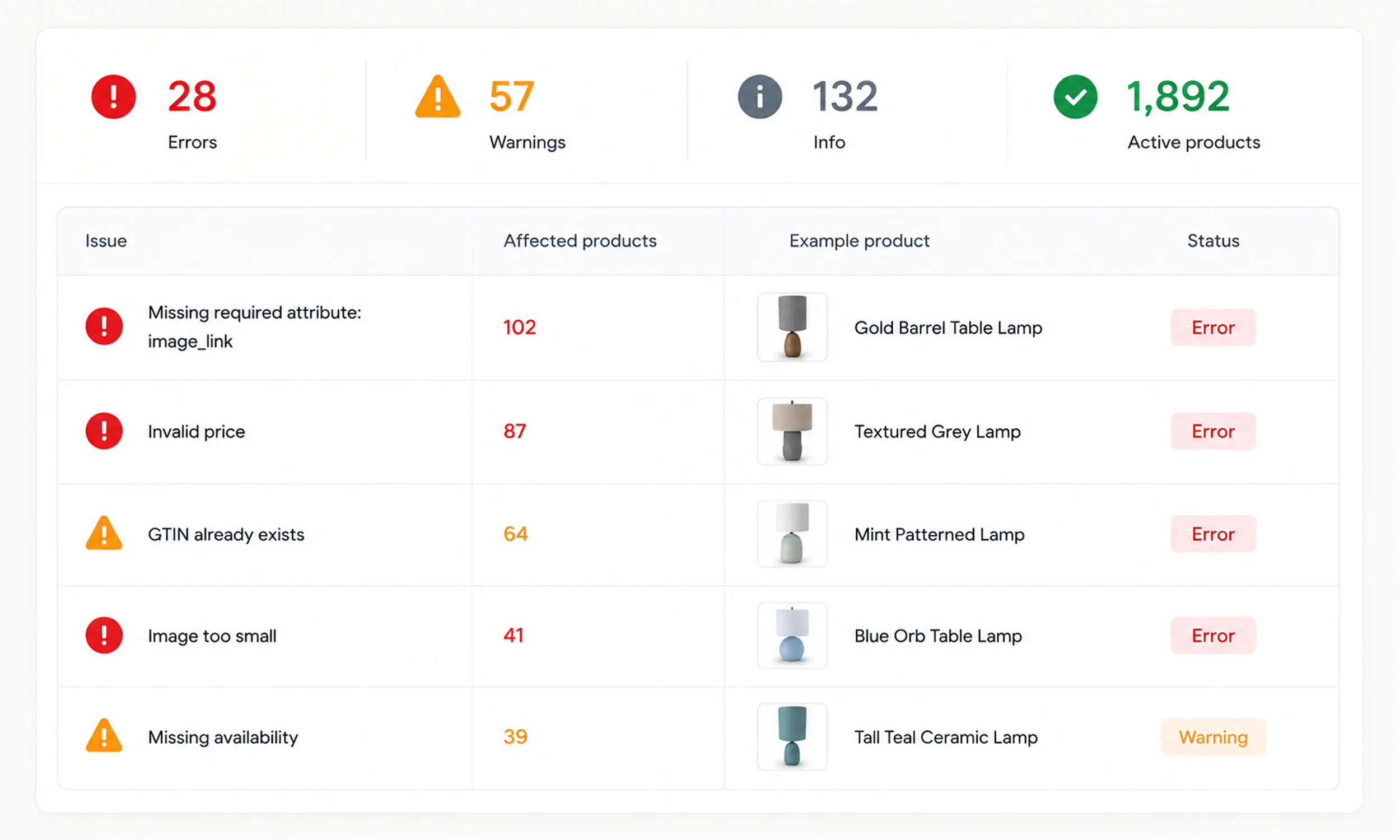
Six recurring causes behind feed errors
Platforms word their errors differently, but nearly all of them trace back to six causes:
Access and format problems - the platform can't fetch or parse your file
Missing or invalid required fields
Identifier problems - GTIN, MPN, brand
Mismatches between feed and landing page - price, availability
Image problems - too small, inaccessible, or policy-violating
Policy and freshness problems - prohibited content, stale feeds
Diagnose in that order. A fetch failure invalidates everything downstream; a policy rejection can't be fixed by editing a title.
Meta: catalog errors in Commerce Manager
Meta surfaces feed issues per upload session under Catalog → Data sources, documented in Troubleshoot data feed errors in your catalog. Five patterns account for most Meta rejections:
Fetch failures - Meta can't access the hosted file, and repeatedly failing schedules get paused until someone manually resumes them
Broken file structure - "Incorrect number of columns" from unescaped commas or line breaks in text fields
Required-field and format failures - empty spec fields, and prices not in Meta's strict
9.99 USDformatIdentifier problems - duplicated IDs, IDs colliding with group IDs, invalid GTINs
Image failures - files under 500 x 500, plus URL-based caching: use a new URL when the image changes
Policy rejections (prohibited and restricted categories under Meta's Commerce Policies) are a separate track - those need an appeal or a catalog change, not a data fix.
The message-by-message reference - every Commerce Manager error with its fix - lives in the dedicated guide: Facebook catalog errors.
TikTok: catalog issues and diagnostics
TikTok lists item-level problems in Catalog → Diagnostics, documented in Catalog issues and suggested actions. What's distinctive about TikTok:
Stricter image gate - below 500 x 500 fails review outright, and the image URL itself must end in a recognized JPEG or PNG extension (
.jpg,.jpeg, or.png)Page consistency checks - TikTok compares feed price and inventory against your landing page, like Google does
Enforced freshness - feeds not updated for 7 days get flagged, and catalogs with no ad activity for 28 days are frozen until you resume
Access problems - CDNs and firewalls blocking TikTok's fetcher need its IPs whitelisted
A formal appeal lane - up to 50 rejected products per month, batch appeals allowed, re-review within about a day
The full error-code list with fixes is in the dedicated guide: TikTok catalog rejections.
Pinterest: numbered error codes in Catalog Diagnostics
Pinterest reports ingestion problems as numbered error codes, which makes triage unusually mechanical. What's distinctive about Pinterest:
Whole-feed failures come first - error 100 (data source couldn't be downloaded) and malformed-file codes (143, 129) block everything; check the hosted URL before anything else
Missing required fields have their own code each - 106/107/111/112 for title, description, image_link, and availability; 113 for price formatting
The claimed-domain rule - error 139 fires when product links don't live on the website you verified; no other platform enforces this
Ingestion is daily and manual uploads decay - a manual feed stops serving ads after 90 days, so "products disappeared" on Pinterest is often just a stale upload
Policy violations (error 4042) route through merchant guidelines - fix the store issue (return policy, availability honesty), then appeal.
The full code-by-code reference is in the dedicated guide: Pinterest catalog errors.
Snapchat: errors, warnings, and media codes
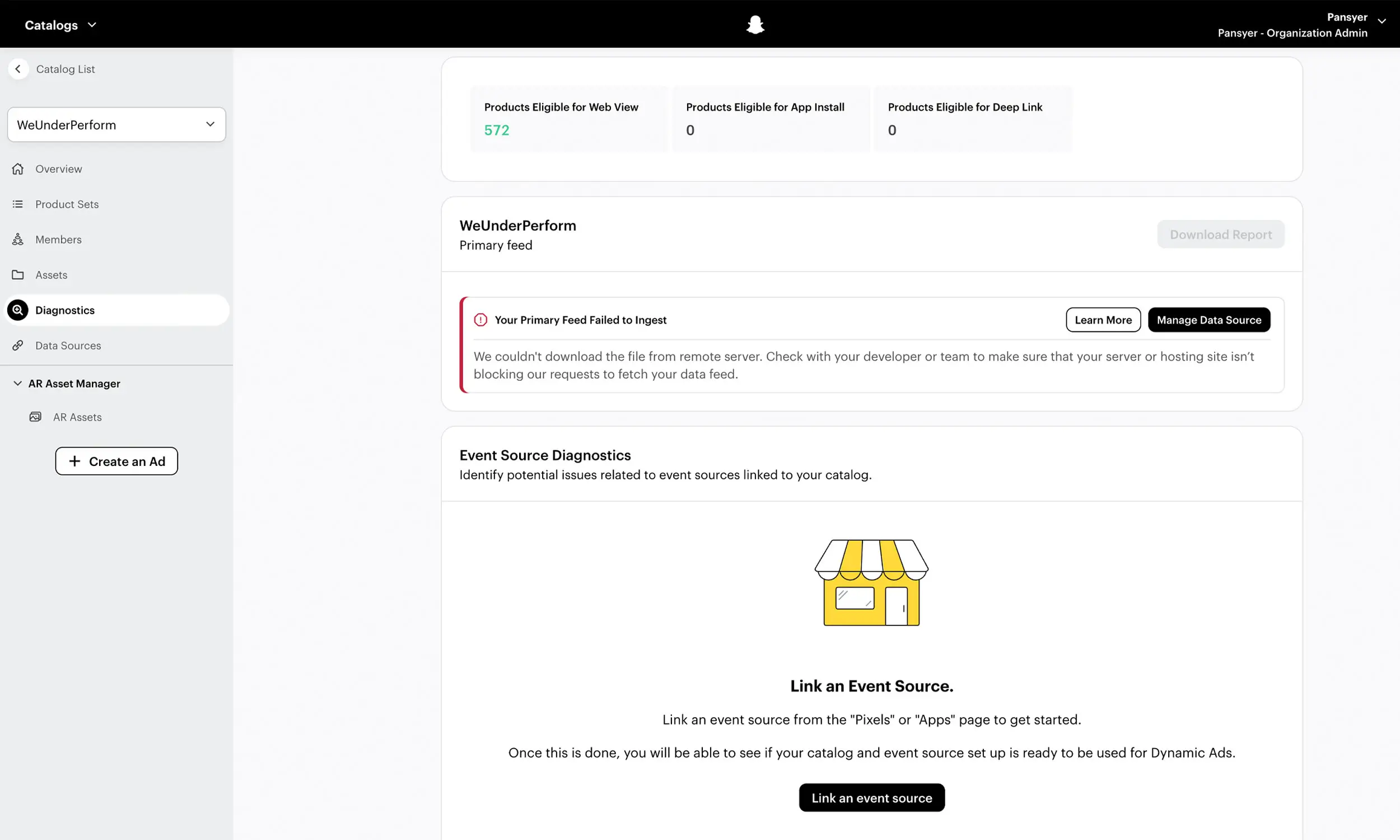
Snapchat's Catalog Diagnostics splits problems into a clean severity model:
Errors vs warnings - a missing required field is an error that blocks the product; a missing optional field is a warning that doesn't. Triage the errors, schedule the warnings.
The error report has a blind spot - image failures aren't included in the downloadable feed error report; check media diagnostics separately.
Media failures carry codes -
AUTH_ERRORandREQUEST_TIMED_OUTmean your server or CDN is blocking Snap's fetcher;UNSUPPORTED_MEDIAmeans a format outside WebP/JPEG/PNG;CONTENT_TOO_LARGEmeans over 5 MB. The product still builds - only the failed images don't serve.Identifier rule is looser - Snapchat requires just one of brand, GTIN, or MPN, so identifier rejections usually mean all three are missing or the GTIN supplied is invalid.
Dynamic Ads have an audience gate - pixel events must match at least 1,000 Snapchatters with
item_idsthat match catalog IDs. "No delivery" on Snapchat is often this threshold or an ID mismatch, not a feed error at all.
The full error-and-gate reference is in the dedicated guide: Snapchat catalog errors.
If you also feed Google Shopping
Google isn't in Flow's platform set, but many stores still feed Merchant Center - so three warnings in brief: Google crawls landing pages and disapproves price/availability mismatches (repeats can suspend the account under Misrepresentation); promotional overlays on images are prohibited - keep Google's image pipeline clean even where you enrich creative for social platforms; and the image minimum rises to 500 x 500 with enforcement from January 31, 2027.
Platform | Cause | Fix |
|---|---|---|
Meta | Missing | Add a valid, crawlable image URL |
Meta | Price mismatch | Match feed price to the product page |
Meta | Policy violation | Review restricted content and resubmit |
TikTok | Invalid availability | Use supported stock values |
TikTok | Broken product URL | Fix the landing page URL |
TikTok | Missing title or description | Fill all required product fields |
Missing identifiers | Add brand, GTIN, or MPN | |
Image too small | Upload a higher-resolution image | |
Outdated price or stock | Refresh the feed more often | |
Snapchat | Invalid image URL | Use an HTTPS image that can be crawled |
Snapchat | Duplicate IDs | Give each product a unique ID |
Snapchat | Category mismatch | Correct the product category mapping |
The cross-platform prevention checklist
Nearly every error above is preventable before upload:
Validate against each platform's current spec, per destination - not one generic check
Enforce unique, stable, case-consistent IDs (they also have to match your pixel's content IDs on Meta and item_ids on Snapchat)
Sync at least daily; during sales, more often - mismatches spike exactly when traffic does
Keep sale prices in
sale_pricefields, never by overwriting base pricesServe images from a fast host at 500 x 500 minimum (Snapchat accepts 200 x 200, but ship the same large renders everywhere), versioned URLs on change
Keep enriched creative in the ad layer for the social platforms, and a clean-photography pipeline for Google if you feed it
Validate GTINs; remove invalid ones rather than shipping them
Strip emojis, HTML, and all-caps with feed rules
Alert on fetch failures and paused schedules - silence is the expensive failure mode
Check diagnostics on a weekly cadence, not when performance drops
Catching feed errors before the platforms do
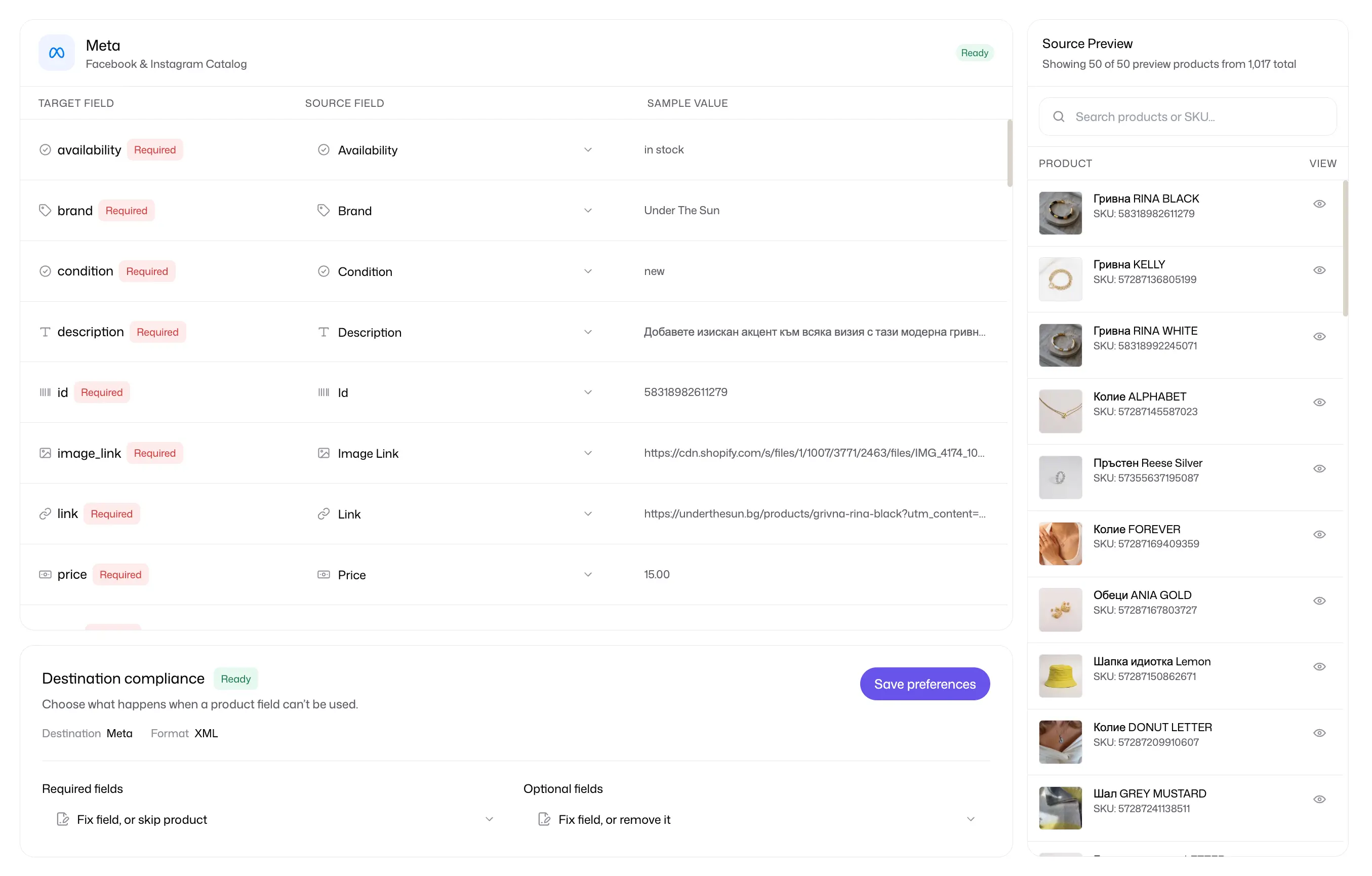
Most errors in this guide are mechanical enough to catch upstream. Flow's catalog engine maps fields, flags missing or unsupported values, previews products, and monitors catalog health before the file reaches a channel. It is the preflight layer; Meta, TikTok, Pinterest, and Snapchat diagnostics remain the final record of what each platform accepted.
Flow also lets the clean catalog image and the template-rendered ad creative remain separate assets. That matters when one destination accepts promotional design while another, such as Google Merchant Center, expects an unedited product image.
FAQ
Why were my products rejected from catalog ads?
Check the platform's diagnostics surface first: Commerce Manager data sources on Meta, and Catalog Diagnostics on TikTok, Pinterest, and Snapchat. Match each reported code against the patterns above, while preserving room for account, policy, fetch, and destination-specific failures.
What is a price mismatch error?
The price in your feed doesn't match the price the platform sees on your landing page. Google and TikTok both crawl and compare. Fix it by syncing your feed more often and keeping structured data on the page accurate.
How do I fix image errors in my product feed?
Meet the minimums (500 x 500 on Meta and TikTok; 1000 x 1500 for Pinterest's primary catalog image; Snapchat's floor is 200 x 200), serve a supported format from a host that doesn't block platform crawlers, and use a new URL when an image changes. On Snapchat, remember image failures don't appear in the feed error report - check media diagnostics separately.
Can I appeal rejected products?
Yes. TikTok allows up to 50 product appeals per month with ~1-day re-review; Meta rejected listings can be appealed for manual review; Pinterest offers a one-click appeal for merchant-guideline violations. Fix genuine data problems first - re-review follows the fix.
How do I stop feed errors from happening again?
Validate before upload, sync daily, monitor fetch failures, and keep per-platform outputs. A pre-publish compliance check catches in seconds what diagnostics tabs report days later.
Final thoughts
Feed errors are not random: a small set of recurring causes explains many rejection messages, but destination-specific codes still matter. Use the shared patterns for preflight validation, then monitor each platform's diagnostics after publishing.
Accurate data in, per-platform-safe output, alerts on silence. That's the whole game.


Join The Newsletter
Stay ahead in catalog advertising
Get practical guides, product updates, new templates, and best practices for Dynamic Product Ads, creative automation, and ecommerce marketing.
On this page
Related articles



Launch catalog ads with ease
Ready to launch better catalog ads?
Turn product catalogs into publishing-ready creatives in minutes.