TikTok is strict about what enters a catalog - stricter than Meta in several ways - and it tells you exactly what's wrong, if you know where to look and what the messages mean. Products that fail don't serve, and on TikTok two extra mechanisms catch teams by surprise: feeds go stale on a timer, and whole catalogs freeze when unused.
This is the complete error reference for TikTok catalogs: every message from the Diagnostics dashboard with its cause and fix. It's the TikTok spoke of our cross-platform product feed errors pillar; the field-by-field spec lives in TikTok product feed.
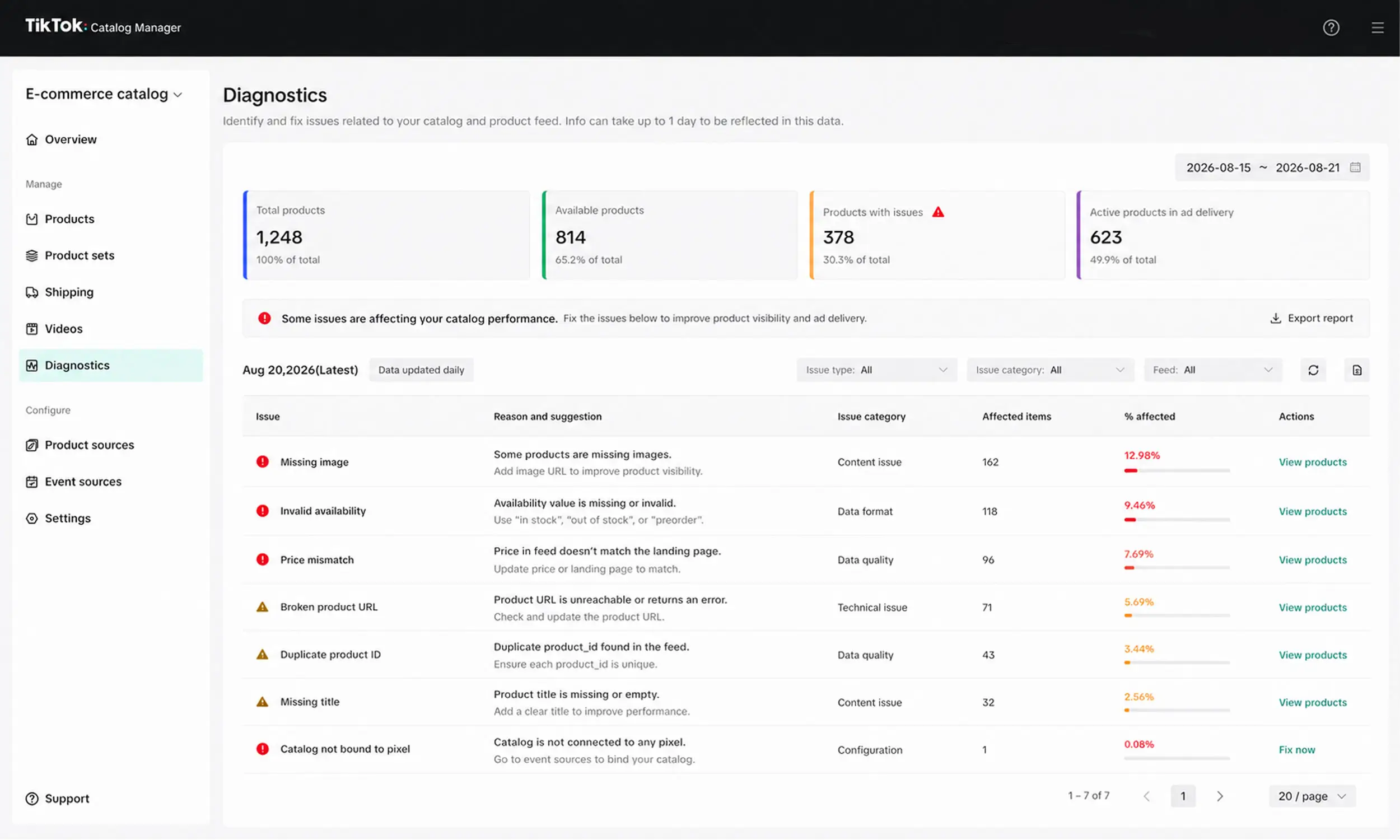
Where TikTok reports problems
TikTok Ads Manager → Assets → Catalogs → your catalog → Diagnostics. The dashboard lists item-level issues with counts and suggested actions; the official reference behind it is Catalog issues and suggested actions.
Work top-down: file and access errors first (they block whole uploads), then field issues, then images, then consistency, then policy.
File and format errors
"Bad format of feed file or link" / "Incorrect feed file or link format" - the file isn't valid CSV/TSV/XML, or the URL doesn't return a raw file. Open the URL in a private window; if you see a web page, so does TikTok.
"Selected feed/file is empty" - the export generated headers without rows. Fix the generation job.
"Incorrect number of columns" - rows with more or fewer values than the header, commonly caused by unescaped delimiters or line breaks in text fields. Quote text fields and validate row width.
"Emojis and control characters are not allowed" - TikTok rejects them in feed text outright. Store data accumulates these (✨ in titles, invisible control characters from copy-paste); strip them with a feed rule at export, not by hand.
Required-field and ID errors
"IDs cannot be duplicated" - every
sku_idmust be unique. Duplicates usually come from variant exports collapsing wrongly; check youritem_group_idstructure.Missing required fields - any of the nine required fields empty fails the row; the spec article lists them with formats.
"'Item group ID' missing", "'Product type' missing", "'Google product category' missing", "'GTIN' missing" - these fields are optional in the spec, but TikTok surfaces their absence in diagnostics because they limit matching and delivery. Treat them as soft requirements: fill what you can from data you already have.
Image errors
TikTok's image gate is the strictest of the major platforms:
"Image is less than 500x500 pixels" - hard minimum, JPEG/PNG only. Sub-spec images don't get a warning; they fail review.
"Image link is invalid and the image information cannot be downloaded" - the URL is broken, blocked, or doesn't end in a recognized JPEG/PNG extension (
.jpg,.jpeg, or.png). TikTok's documentation requires an image extension in the URL."Image download failed due to server" - your image host is slow or intermittently failing; serve catalog images from a CDN.
"'Additional image link' missing" - optional, but flagged; extra angles improve both review outcomes and delivery.
Keep catalog images clean per TikTok's quality guidance: white or simple backgrounds, no watermarks, no logos stamped on the photo. Branded, enriched creative belongs in the ad layer - the division of labor explained in catalog ad design.
Access errors
"TikTok doesn't have permissions to access the image/product information hosted on your server" - your CDN, firewall, or bot protection is blocking TikTok's fetcher. Whitelist TikTok's crawler IPs for your feed and image hosts. Cloudflare-style bot rules are the usual culprit.
"Product link cannot be accessed" / "Invalid or inaccurate product link" - the landing page 404s, redirects badly, or geo-blocks the crawler.
Consistency errors: TikTok checks your pages
Like Google, TikTok crawls landing pages and compares them against the feed:
"Product price and page price are inconsistent" - the feed says one price, the page shows another. Causes: sync lag after price changes, JavaScript-rendered prices the crawler can't read, currency/market variants. Fix with faster syncs and a crawlable price on the page.
"Product inventory and page inventory are inconsistent" - same mechanism for stock status.
These are the errors that spike during sales - exactly when you can least afford disapprovals. Sync more often during promotions, and put sale prices in sale_price rather than editing base prices.
Freshness and binding errors
TikTok's most distinctive category - problems with the catalog's lifecycle rather than its data:
"This product feed hasn't been updated in the last 7 days" - a staleness flag. Any successful scheduled sync clears it; if you see it, your schedule is broken or missing.
"This catalog is frozen due to a lack of advertising activity in the last 28 days" - dormant catalogs freeze. Resuming ad activity thaws them. If you're returning from a pause, expect this rather than assuming data problems.
"This catalog is not bound to pixel or app" - dynamic retargeting needs the catalog connected to your pixel (or app), with event
sku_ids matching the feed. Bind it in catalog settings and verify events carry matching IDs.
Policy rejections and appeals
"Product was disapproved due to prohibited content" - the product (or its title/description/image) tripped TikTok's content policies. Beyond catalogs, general ad review rules also apply to landing pages: pages that 404, aren't mobile-friendly, or lack contact/refund/privacy information fail review.
For false positives, TikTok has a formal appeal lane: up to 50 products per month, batch appeals supported, with re-review typically inside a day. Budget those 50 slots: appeal legitimate products immediately, fix genuinely non-compliant ones instead of burning appeals on them.
Message | Cause | Fix |
|---|---|---|
Product was disapproved due to prohibited content | Product or product information violates TikTok advertising/catalog policies. | Remove or correct the non-compliant content. If you believe the rejection is incorrect, submit an appeal. |
Product image violates policy | ⚠️ Not an official Catalog Diagnostics message as written. The image may violate advertising policy or catalog image requirements. | Replace the image with a compliant, high-quality product image. |
Invalid or inaccurate product link | Product URL is incorrect, inactive, misspelled, or broken. | Use an active product URL beginning with |
Product link cannot be accessed | TikTok cannot access the landing page, including because of access restrictions. | Make the landing page publicly accessible to TikTok. |
Landing page missing required business/policy information | ⚠️ Valid TikTok policy issue, but not an official Catalog Diagnostics label. Required information may be missing from the website. | Add the business and policy information required for your market, including applicable privacy, payment, refund, and company information. |
Landing page not mobile-friendly | ⚠️ Valid TikTok landing-page requirement, but not a standard Catalog Diagnostics message. | Make the landing page functional and usable on mobile devices. |
Missing required attribute: price | For applicable e-commerce/catalog types, the required | Provide a valid price and currency for each applicable product. |
Product price and page price are inconsistent | Catalog price does not match the landing-page price. | Make the catalog price match the price displayed on the landing page. |
GTIN missing | GTIN has not been supplied for the relevant product. | Add the correct GTIN where applicable. |
Missing | Required primary product-image URL is missing. | Provide a valid product image URL. |
Image link is invalid and the image information cannot be downloaded | TikTok cannot download the image from the provided URL. | Update the image URL and make sure TikTok can access it. The image should be JPEG/JPG or PNG. |
Image is less than 500x500 pixels | Image doesn't meet TikTok's minimum catalog dimensions. | Replace it with an image at least 500 × 500 pixels. |
Product inventory and page inventory are inconsistent | Catalog availability does not match the landing page. | Keep catalog inventory/availability synchronized with the landing page. |
IDs cannot be duplicated | Multiple products use the same product/SKU ID. | Use a unique ID for each product or variant as appropriate. |
Missing required attribute: title | Required product title is missing. | Add a valid, descriptive product title. |
Title exceeds 150 characters | Product title exceeds TikTok's recommended/allowed catalog length. | Shorten the title to 150 characters or fewer. |
The TikTok prevention checklist
Image URLs end in
.jpg,.jpeg, or.png, files are at least 500 x 500, and the CDN permits TikTok's fetcherUnique
sku_idper row; variants grouped underitem_group_idEmojis and control characters stripped at export
Text fields quoted; feeds validated before upload
Daily scheduled sync - clears the 7-day flag by construction
TikTok crawler IPs whitelisted on feed and image hosts
Crawlable prices on landing pages; faster syncs during sales
Catalog bound to pixel, event IDs spot-checked against feed IDs
Diagnostics reviewed weekly; appeal slots used deliberately
Catching TikTok catalog errors before upload
The cheapest TikTok error is the one stopped before upload. Flow's catalog engine can map fields, validate feed values, preview products, and monitor catalog health before the export reaches TikTok.
That covers the mechanical layer of this guide. TikTok Diagnostics still owns the destination result, and campaign state, policy review, appeals, image fetching, and the seven-day activity rule must be checked inside TikTok.
FAQ
Why were my TikTok catalog products rejected?
Open Catalog → Diagnostics and match the exact message against this guide. High-value checks include images under 500 x 500 or extensionless image URLs, price mismatches with the landing page, and emojis or control characters in text fields.
Why is my TikTok catalog frozen?
No advertising activity for 28 days freezes a catalog automatically. It's not a data problem - resume ad activity and it thaws.
How do I appeal rejected products on TikTok?
From the catalog's rejected products view - up to 50 products per month, batch appeals allowed, re-review usually within a day. Reserve appeals for false positives; fix real violations instead.
Why does TikTok say my price is inconsistent?
TikTok crawled your landing page and saw a different price than the feed. Sync more often, keep prices crawlable (not JavaScript-only), and use sale_price for promotions.
Does TikTok really require feed updates every 7 days?
It flags feeds older than 7 days in diagnostics. A daily scheduled sync - which you want anyway for price accuracy - makes the flag impossible.
Final thoughts
TikTok's catalog errors look intimidating in aggregate and mechanical one by one: an extension missing from an image URL, an emoji in a title, a price the crawler saw differently, a schedule that stopped. Every one has a rule-shaped fix, and every rule can live in your feed pipeline instead of your memory.
Validate before upload, sync daily, and check diagnostics weekly to reduce preventable rejections and catch policy issues quickly.


Join The Newsletter
Stay ahead in catalog advertising
Get practical guides, product updates, new templates, and best practices for Dynamic Product Ads, creative automation, and ecommerce marketing.
On this page
Related articles



Launch catalog ads with ease
Ready to launch better catalog ads?
Turn product catalogs into publishing-ready creatives in minutes.