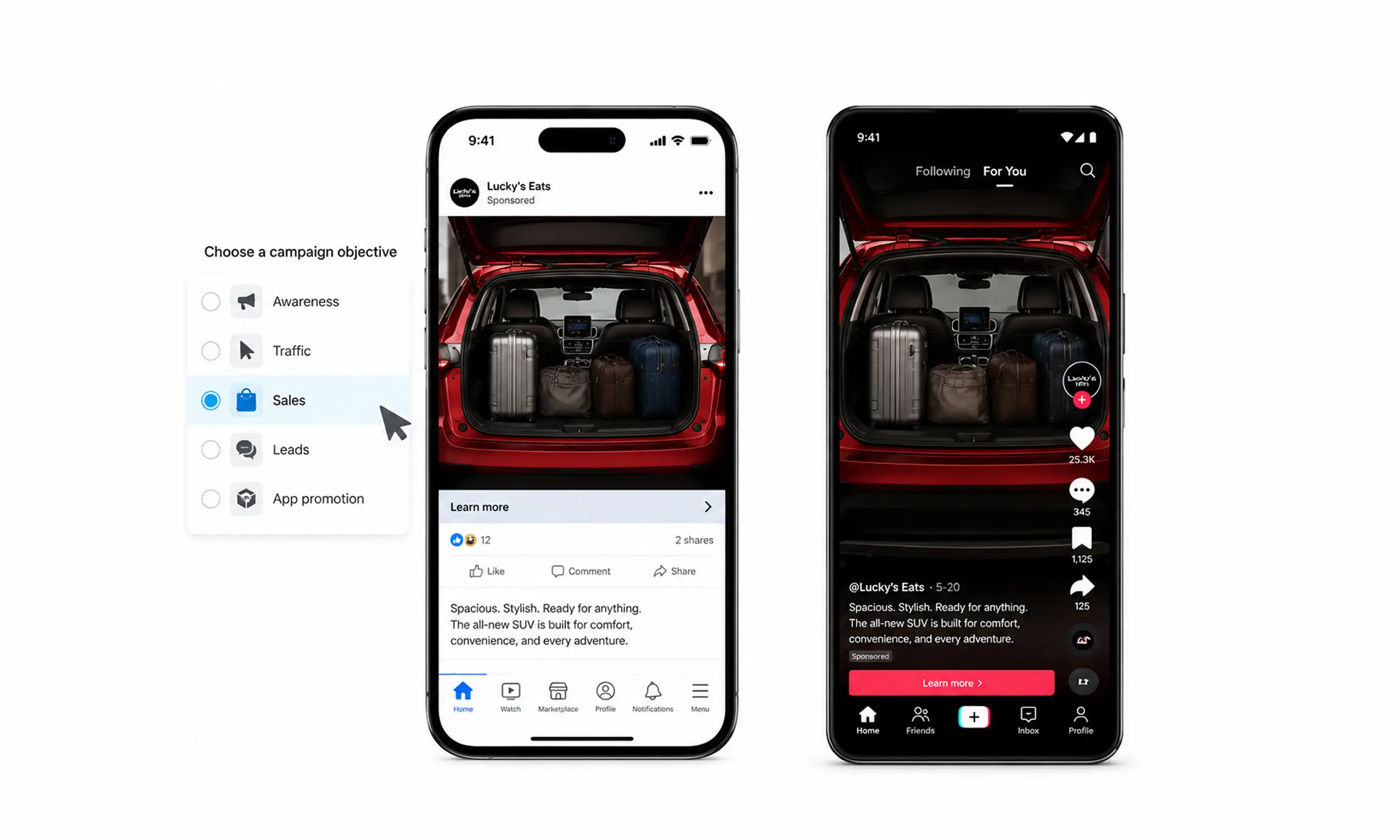
Catalog ads solve the scale problem: thousands of products, advertised automatically from a feed. What they don't solve is attention. By default, every catalog ad shows the same thing - a product photo shot for a product page, cropped into a square, next to a title and a price.
That's why so many catalog campaigns look identical. The automation works; the creative was never designed.
This guide covers the design side of catalog advertising: what each platform requires, which design patterns actually lift performance, and how to apply a design across an entire catalog without editing products one by one. If you're new to how catalog ads work, start with our practical guide to catalog ads.

Why catalog ad design matters
A catalog ad competes in the same feed as every other brand's catalog ad, often showing similar products at similar prices. When the creative is a raw product photo, the only differentiators left are price and luck.
Product imagery also carries more weight with buyers than most teams assume. In Salsify's 2025 research, 42% of shoppers abandoned a purchase or returned a product because of missing or low-quality product images and videos.
And because catalog ads reuse one image per product across every placement, a single design decision multiplies across your whole catalog - for better or worse. Design is the highest-leverage input you control after the feed itself.
The baseline: what each platform requires
Before designing anything, know the constraints. These are the current official requirements.
Meta (Facebook and Instagram)
JPEG or PNG, maximum 8 MB
Minimum 500 x 500 pixels; 1024 x 1024 recommended
Carousel cards should share one aspect ratio (1:1 or 4:5), or Meta may auto-adjust all of them
On Reels and Stories (9:16 surfaces), interface elements cover parts of the image - keep key content inside safe zones
Meta recommends at least 4 images per product for carousel and Shops experiences
Meta's own guidance for catalog images is conservative: avoid overlay text, CTAs, promo codes, and watermarks on the base product image. That advice applies to the image in your feed - it doesn't stop you from serving designed, ad-specific creative. It means the enrichment should happen in a separate rendered image built for ads, not by scribbling on your website photography. More on that below.
From Meta's product image specifications
TikTok
TikTok is stricter about what enters the catalog and looser about creative energy:
Catalog images: JPEG or PNG only, minimum 500 x 500 pixels, and the URL must end in
.jpegor.png. Sub-spec images fail catalog review.TikTok recommends clean backgrounds and no watermarks or logos stamped on catalog images.
Catalog Ads video creative must be 5-60 seconds, include audio, and stay dynamic - static imagery may not exceed half the video.
The takeaway: TikTok wants motion. Even for catalog ads, the winning creatives look native to the feed. See TikTok Catalog Ads for the full picture.
Design patterns that work in catalog ads
Across enriched catalog campaigns, a handful of patterns show up again and again because they answer the questions a buyer has in the half-second they give your ad.
Visible price, designed - not defaulted. Platforms can render a price sticker for you, but a price integrated into the layout (right size, brand typography, positioned consistently) reads as intentional rather than automated.
Strikethrough plus sale price. The single highest-impact pattern for promotions. Show the original price crossed out next to the sale price pulled from your
sale_pricefield.Discount badges. "-30%" computed from price fields, rendered as a badge. Works because it's information, not decoration.
Brand frame. A consistent border, color field, or logo placement that makes every product in the carousel recognizably yours. This is what makes a catalog campaign look like a campaign.
Campaign backgrounds. Replace or recolor the background to match the season or promotion - summer sale, Black Friday, new collection - while the product cutout stays untouched.
Product name as a design element. Long titles truncate; a template can place the name where it fits and style it legibly.
Urgency and context labels. "Bestseller", "Back in stock", "Last sizes" - driven by feed fields, so they appear only where true.
Every one of these is data-driven: the design reads values from the feed and renders them. That's what separates catalog creative from manual design - the layout is fixed, the content updates itself.
Templates: design once, apply to every product
Editing images per product doesn't survive contact with a real catalog. At 500 products and three formats, "quickly adding a price badge" is 1,500 image edits - repeated every time a price changes.
Reusable templates invert the work. You design a layout once: where the product image sits, where the price renders, what the background is, how badges behave. The template is then applied across products or collections, and every creative generates automatically - including regeneration when the feed changes.
This is the same principle behind modular design in creative production: separate the design system from the product data, and both can change independently.
The practical benefits:
A sale goes live by switching templates, not by re-editing images
New products inherit the design the moment they enter the catalog
Seasonal refreshes are a template duplicate away
Your website photography stays untouched - ad creative is rendered separately
Moeto Detstvo ran promotional catalog creatives across 15+ collections and 400+ products this way: one design system, applied per collection, launched without a single manual image edit.
Design for every format from the start
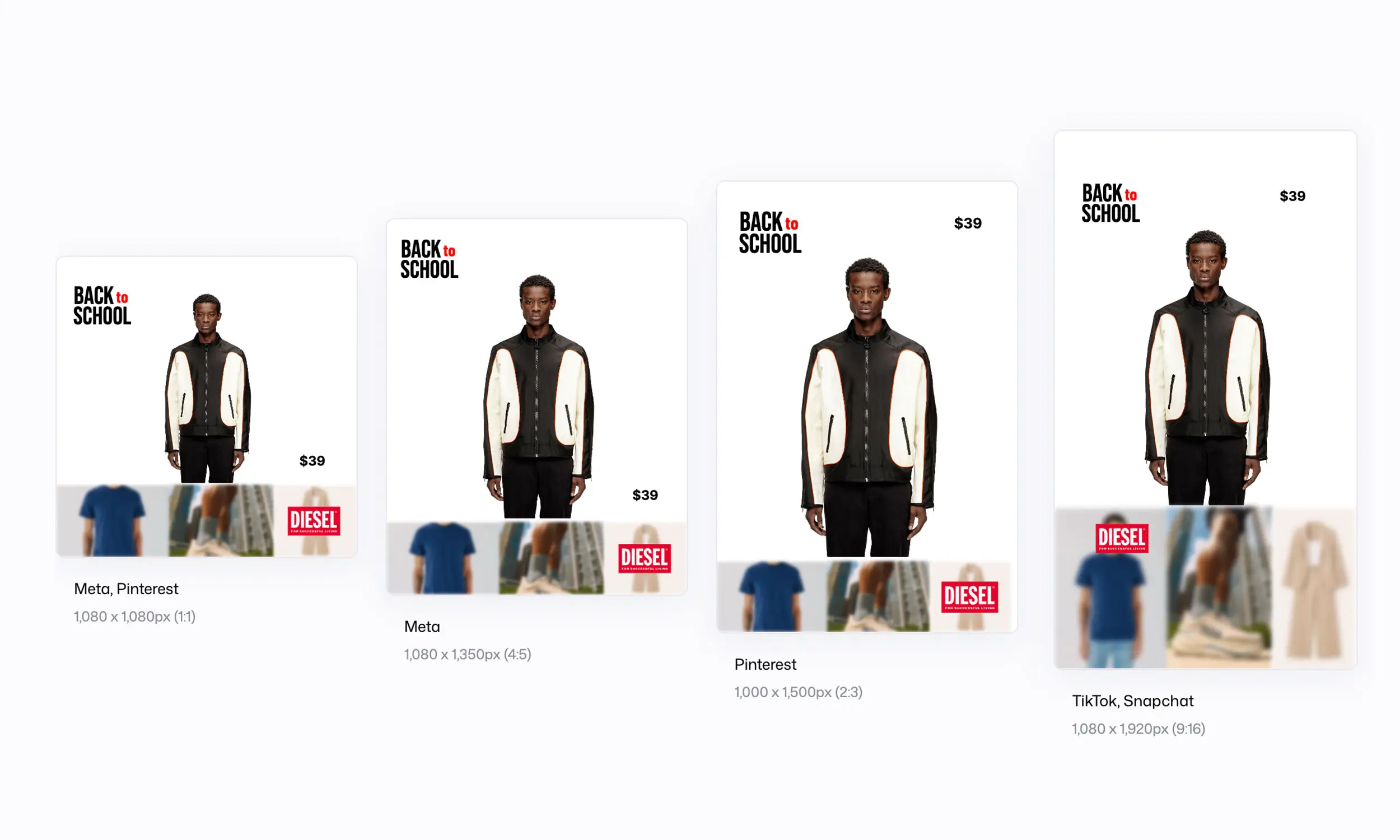
A catalog serves many placements, and each has its own geometry:
1:1 (square) - the default for feeds, carousels, and Shops
4:5 (portrait) - taller feed placements; also carousel-compatible on Meta
9:16 (vertical) - Reels, Stories, TikTok, with UI overlays eating the edges
Design templates for all three at once, not just the square. The rules that matter:
Keep the product large; it should survive a 50% size reduction and still read
In 9:16, keep price and text inside the central safe area - Meta's interface covers parts of the bottom and right edges
Keep one visual system across ratios so a user scrolling from feed to Stories sees the same campaign
Static, carousel, or video?
Start with enriched static images in carousels - they're generated from the feed, cheap to produce, and easy to test. The carousel format itself does selling work: multiple products, each with its own price and link.
Add catalog video where the platform rewards it:
Meta supports up to 20 product videos per item via the feed's video fields, and video tends to earn placement advantages on Reels
On TikTok, video isn't optional culture-wise - and remember the 5-60 second, audio-required, mostly-dynamic format rules
Templated product video - the product image animated inside a branded motion layout - is the scalable middle ground between static frames and full production.
Test templates, not ads
Because every creative comes from a template, testing simplifies: instead of testing thousands of individual ads, you test a handful of templates against each other.
Run two template variants on the same product set and compare CTR and ROAS
Change one variable per test - badge style, background, price treatment
Watch frequency: when performance decays, rotating the template refreshes the entire catalog's creative at once - the practical antidote to ad fatigue
How Flow fits into the workflow
Flow is built for exactly this workflow. Product catalogs are imported from Meta Catalogs or CSV/XML feeds, and combined with reusable templates in the creative studio: product cutouts, price and discount layers, badges, brand frames, and campaign backgrounds that render across 1:1, 4:5, and 9:16 automatically.
The original website images stay untouched, and when product data changes, the creatives re-render. Under The Sun transformed 1,500+ products into campaign-ready catalog ads with this approach - one design system instead of 1,500+ image edits.
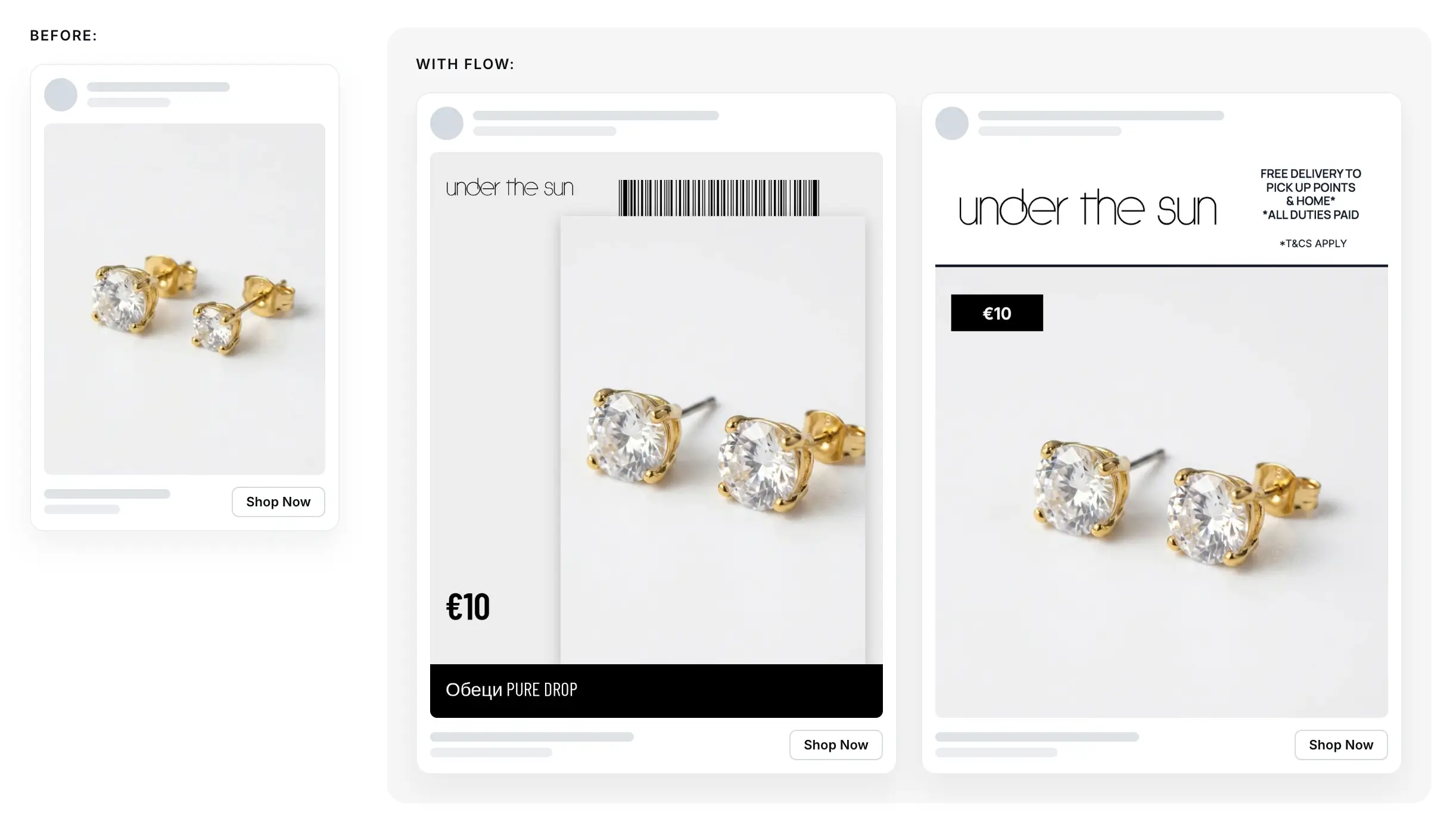
Example of a Meta carousel ad by Under the Sun
FAQ
Can I add text and prices to my catalog ad images?
Yes, on Meta and TikTok - but do it with rendered, ad-specific creative, not by editing your website photos.
What image size should catalog ads use?
Provide at least 1024 x 1024 for Meta (500 x 500 is the minimum) and at least 500 x 500 for TikTok. Design in 1:1, 4:5, and 9:16 for full placement coverage.
How do I put discounts on hundreds of products at once?
Use feed fields (sale_price, or a computed discount percentage) rendered by a template. The badge appears automatically on every discounted product and disappears when the sale ends.
Do enriched catalog ads actually perform better?
Enrichment adds the information buyers act on - price, discount, brand - into the creative itself, and it's the main way to differentiate identical-looking catalog ads. Test it against your defaults: run one product set with raw images and one with a template, and compare.
How often should I refresh catalog ad creative?
Watch frequency and CTR decay rather than the calendar. With templates, a refresh is a design change applied catalog-wide, so refreshing every major campaign or season is realistic.
Final thoughts
Catalog ads automate distribution; they don't automate attention. The brands winning with catalog advertising treat the feed and the design as one system: accurate product data, rendered through templates that carry the brand, the price, and the promotion in the creative itself.
Design once, connect it to the feed, and every product in your catalog ships with creative that looks intentional - at any scale.


Join The Newsletter
Stay ahead in catalog advertising
Get practical guides, product updates, new templates, and best practices for Dynamic Product Ads, creative automation, and ecommerce marketing.
On this page
Related articles



Launch catalog ads with ease
Ready to launch better catalog ads?
Turn product catalogs into publishing-ready creatives in minutes.