Pinterest is where people plan purchases before they make them. That makes it an unusual advertising environment: users are actively looking for products, but often haven't decided on a brand yet. Pinterest currently reports that 96% of top searches are unbranded, indicating room for product discovery beyond known brands.
The platform reached 631 million monthly active users in Q1 2026, growing 11% year over year - its tenth straight quarter of double-digit growth. For ecommerce brands already running catalog ads on Meta and TikTok, Pinterest is a channel to evaluate because it can run from much of the same product data.
This guide covers the full setup: catalogs, feed fields, ad formats, dynamic retargeting, Performance+, and the creative specs - including the one that trips up every multi-platform advertiser (Pinterest is vertical).
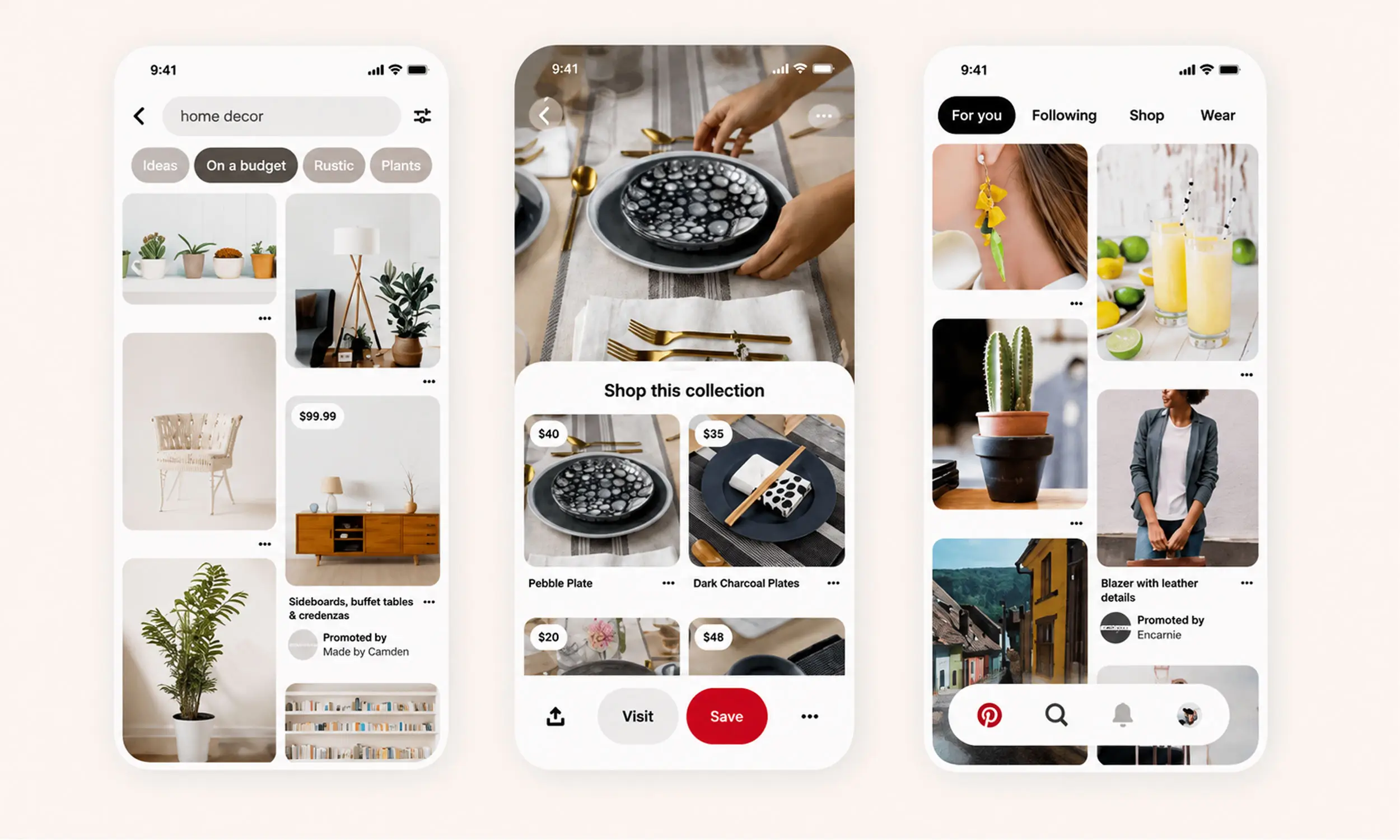
How Pinterest catalog ads work
The pipeline mirrors other platforms, with Pinterest's own vocabulary:
You connect a catalog - a data source file Pinterest ingests roughly daily
Products become product Pins with prices, availability, and links
You group products into product groups (Pinterest's version of product sets)
Product groups are promoted as shopping ads under the Catalog sales objective, or retargeted dynamically
Ingestion runs once every 24 hours, with no on-demand refresh - plan price changes accordingly. Manual uploads exist but go stale: they need re-uploading every 7 days for organic distribution and stop serving ads after 90 days. Use a hosted feed URL.
Capacity is generous: up to 20 million products per feed and up to 50 data sources per business account once your first is approved.
Before you start: requirements
From Pinterest's catalog prerequisites and merchant guidelines:
A Pinterest business account with a claimed website
The Pinterest tag installed on your site
Visible contact information, a clear shipping policy, and a clear return policy with process and timelines
Product Pins must represent specific, purchasable products - no services
Price and stock must stay current - Pinterest expects data refreshed within 7 days, which daily feed sync handles
Pinterest's Verified Merchant Program still exists in 2026 and is worth pursuing once you're stable: a blue verified badge and merchant details on your profile. Eligibility includes an account at least 3 months old, at least 75% of catalog products ingesting successfully, and steady conversion events (page visits, add-to-carts, and checkouts flowing every 7 days over a 30-day window).
Setting up your catalog
Supported data source formats: CSV, TSV, and XML (RSS 2.0 / ATOM 1.0), plus Google Sheets. Compressed .zip/.gz files are accepted; password-protected files and Dropbox links are not. Hosted URLs can use https://, http://, ftp://, or sftp://.
Required feed fields
Pinterest's required set is smaller than Meta's or TikTok's:
id(max 127 characters)titledescriptionlinkimage_link- the current catalog specification requires the primary image to be at least 1000 x 1500 pixelspriceavailabilityitem_group_id- required only when products have variants
Notably, condition is optional on Pinterest (unlike Google), and brand is optional too. Missing or malformed required fields don't just skip a product - they can fail ingestion of the catalog, so validate before upload. The same feed management workflow you run for Meta covers this: one source catalog, per-platform output.
Optional fields worth filling
sale_price- must be lower than price; powers sale displaysadditional_image_link- up to 10 extra imagesgoogle_product_categoryandproduct_type- improves matching and organizationaverage_review_ratingandnumber_of_reviews- Pinterest can display ratings, a differentiator most feeds ignorecustom_label_0throughcustom_label_4- segmentation for product groups (generous 511-character limit)video_link- product video up to 2 GBad_link- a separate tracking URL for adsai_disclosures- Pinterest's field for disclosing AI-generated content, new in the current spec
Product field | Meta | TikTok | |
|---|---|---|---|
id / sku_id | Required | Required | Required |
title | Required | Required | Required |
description | Required | Required | Required |
availability | Required | Required | Required |
condition | Optional | Required | Required |
price | Required | Required | Required |
link | Required | Required | Required |
image_link | Required | Required | Required |
brand | Optional | At least one of | Required |
item_group_id | Required only for products with variants | Optional | Optional |
Ad formats: shopping ads, collections, and retargeting
Shopping ads
Created from product groups under the Catalog sales objective, in four formats: standard (single product Pin), video, carousel, and personalized collections. Shopping ads inherit targeting from Pinterest's intent data - they surface in search results and home feeds where users are already browsing products.
Collections ads
Collections show one hero creative above three secondary products in the mobile feed; tapping opens a fullscreen experience with up to 24 products. You can hand-pick the products or let Pinterest generate personalized collections from your catalog automatically.
Dynamic retargeting
Pinterest's DPA equivalent: dynamic retargeting shows site visitors the exact products they viewed or carted - or similar catalog items. Requirements match the Meta pattern: an active catalog plus the Pinterest tag passing PageVisit, AddToCart, and Checkout events with product IDs that match your feed. Lookback windows run from 7 to 180 days.
The implementation reuses the same event and ID-matching concepts as Meta, but setup time depends on tag coverage, consent configuration, and catalog quality.
Performance+: Pinterest's automation layer
Pinterest Performance+ is the platform's AI campaign suite (launched October 2024, now global) covering Consideration, Conversions, and Catalog sales objectives. It cuts campaign inputs roughly in half and bundles:
Performance+ bidding and budget automation
Performance+ Creative, which generates lifestyle backgrounds for product images
Performance+ ROAS bidding, optimizing toward higher checkout values
Pinterest's launch testing reported at least a 10% improvement for most advertisers in CPA for Conversion and Catalog sales campaigns or CPC for Consideration campaigns, plus at least a 15% ROAS increase for most advertisers in alpha testing of ROAS bidding. These are vendor-reported early-test results, not a guarantee. Pinterest recommends 50+ weekly conversion events and 10+ ads per ad group before leaning on the automation.
Treat Performance+ like Advantage+ on Meta: give it a clean catalog and enough conversion volume, and constrain it with product groups rather than micromanaged settings.
Creative specs: Pinterest is vertical
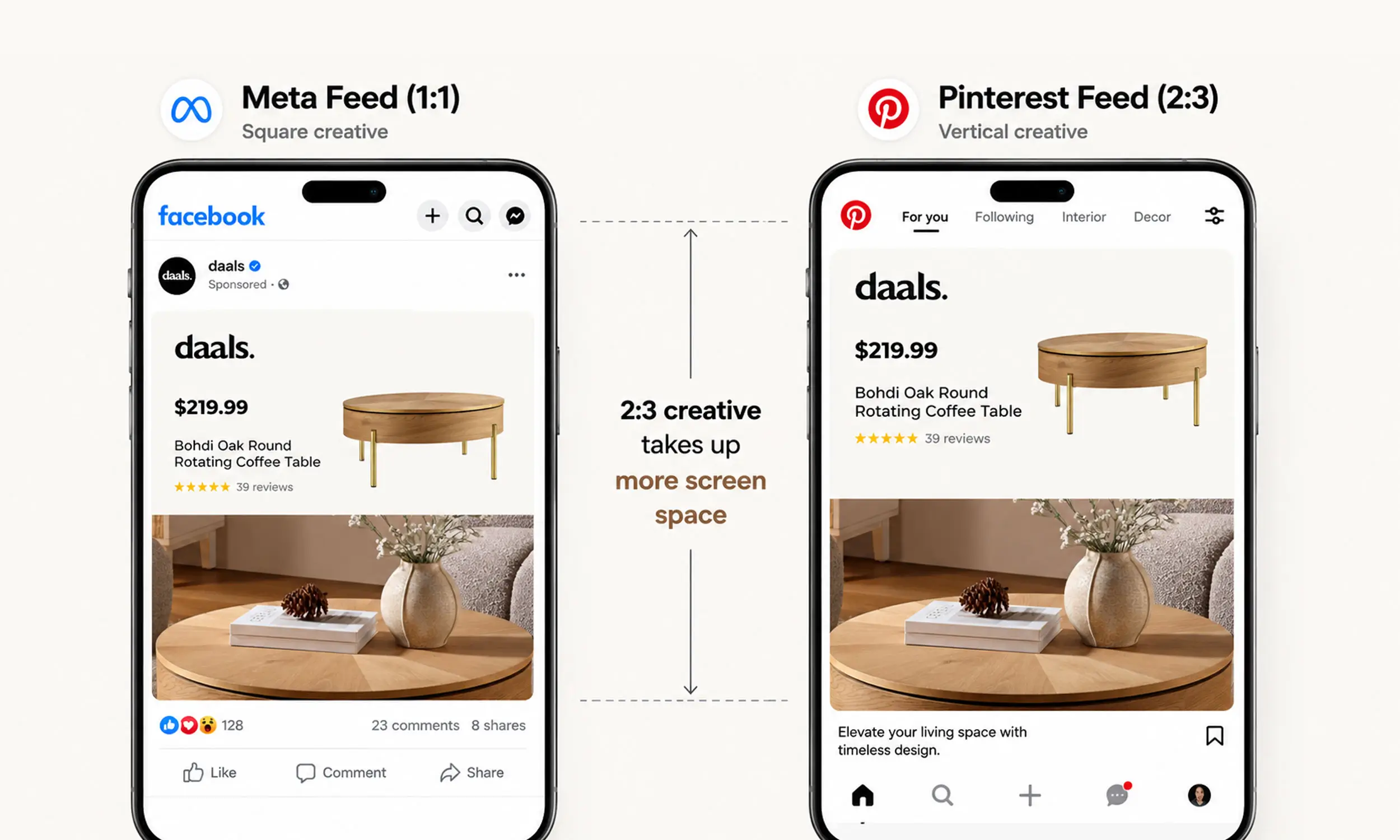
A common cross-platform mistake is sending only 1:1 Meta creative to Pinterest. Pinterest's primary catalog image requirement and ad recommendations favor portrait 2:3 assets, and its specs reflect that:
Standard and shopping images: 2:3 aspect ratio recommended, 1000 x 1500 pixels, PNG or JPEG, up to 20 MB
Titles: up to 100 characters, with roughly the first 40 visible in feed
Video: 1:1 or vertical (2:3, 4:5, 9:16), 6-15 seconds recommended, up to 2 GB
Carousel: 2-10 images for catalog sales, 1:1 or 2:3
Collections: hero in 1:1 or 2:3 with at least 3 secondary creatives
A square image in a portrait grid simply occupies less screen. If your catalog ad design system renders templates per ratio - as it should for Meta's 9:16 surfaces anyway - adding a 2:3 output gets you native-looking Pinterest creative from the same product data. Editorial, lifestyle-leaning design is a sensible Pinterest hypothesis, not a universal performance rule. Test it against a clearer promotional treatment while holding the product set and audience constant.
Common catalog errors on Pinterest
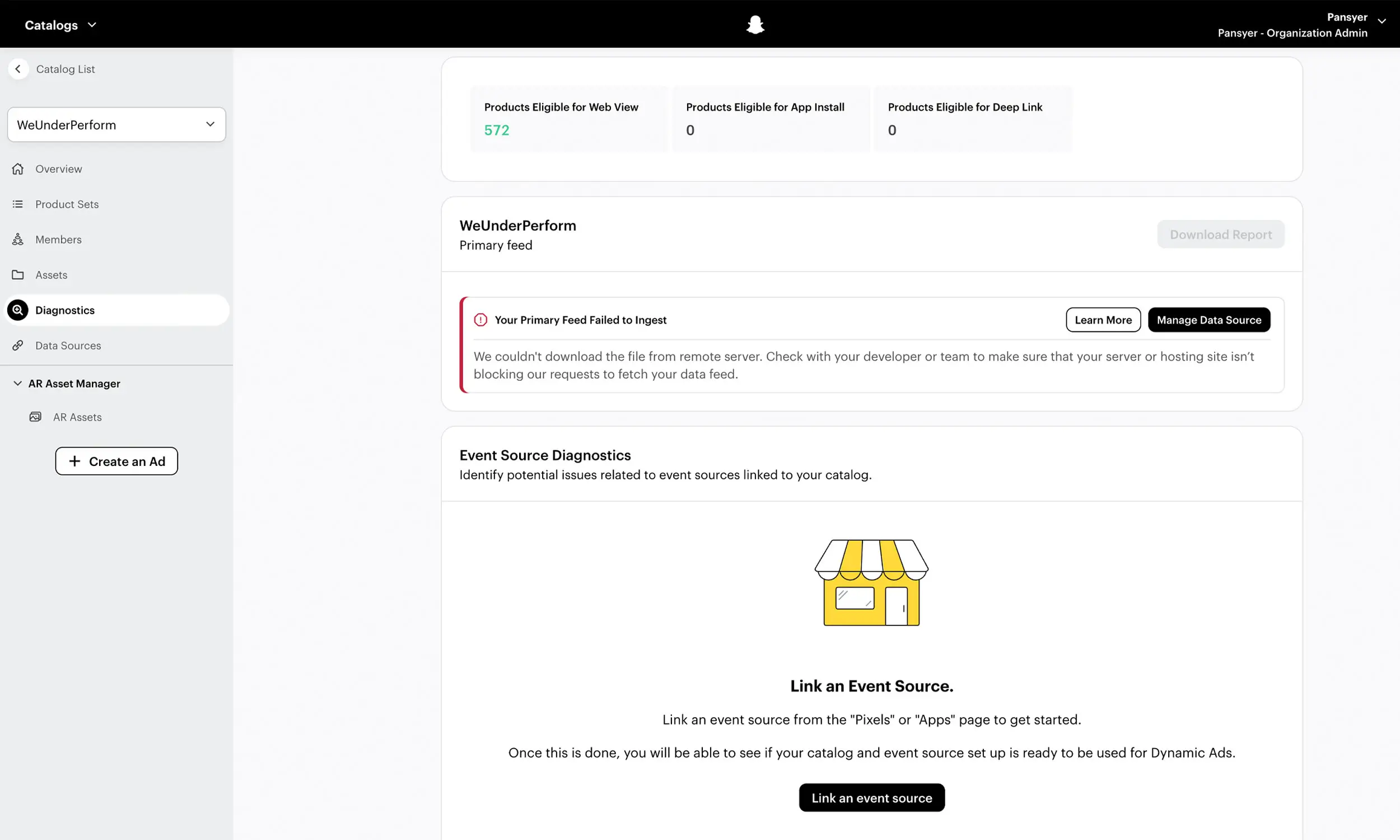
Pinterest reports ingestion problems with numbered error codes in Catalog Diagnostics. The ones you'll actually meet:
Error 100 - data source couldn't be downloaded: check the hosted URL is public and correct
Errors 106 / 107 / 111 / 112 - missing title, description, image_link, or availability: required-field failures
Error 113 - price formatting: number plus ISO currency, no symbols
Error 179 - GTIN format invalid
Error 123 - duplicate items: same
idon multiple rowsError 139 - product link doesn't match your claimed domain: links must live on the website you verified
Errors 1001 / 1007 - image not found or invalid: check image URLs resolve directly to the file
Error 4042 - merchant guidelines violation: policy issue, not a data issue; fix the store, then appeal
The prevention playbook is the same as everywhere: validate required fields per platform before upload, sync daily, keep links on the claimed domain, and monitor diagnostics weekly.
Building Pinterest-native creative from one catalog
Pinterest should be a new channel output, not a second catalog and design operation. Flow's Pinterest workflow uses reusable product templates, variations, collections, and creative review to turn the governed catalog into Pinterest-specific work.
The important distinction is that reuse does not mean recycling a square Meta asset. Build and review a true 2:3 treatment at 1000 × 1500, then let the shared catalog supply the products, prices, and promotions behind it.
FAQ
What are Pinterest catalog ads?
Feed-powered product ads: Pinterest ingests your catalog, turns products into product Pins, and serves them as shopping ads, collections, and dynamic retargeting from product groups you define.
What aspect ratio should Pinterest product ads use?
Use 2:3 portrait. The current catalog requirement makes the primary image_link at least 1000 x 1500 pixels, and Pinterest also recommends 1000 x 1500 for standard and shopping ads. Square assets remain accepted in some ad formats but occupy less vertical space in the grid.
How often does Pinterest update my catalog?
Hosted data sources ingest roughly once every 24 hours, with no on-demand refresh. Manual uploads stop serving ads after 90 days, so use a hosted feed URL.
Does Pinterest have dynamic retargeting like Meta's DPA?
Yes - it retargets site visitors with exact or similar catalog products, using Pinterest tag events (PageVisit, AddToCart, Checkout) matched to feed IDs, with 7-180 day lookback windows.
Is the Verified Merchant Program worth it?
Yes, once eligible - it's free, adds a trust badge, and its requirements (stable feed ingestion, steady conversion events) are things a healthy setup does anyway.
Final thoughts
Pinterest catalog ads run on infrastructure you already have: the same product feed, the same event taxonomy, the same template thinking - re-rendered for a vertical, planning-minded audience that hasn't picked a brand yet.
Set up the catalog properly, ship 2:3 creative instead of recycled squares, and let product groups plus Performance+ do the targeting. For most ecommerce brands, that's a new channel launched from data that's already flowing.


Join The Newsletter
Stay ahead in catalog advertising
Get practical guides, product updates, new templates, and best practices for Dynamic Product Ads, creative automation, and ecommerce marketing.
On this page
Related articles



Launch catalog ads with ease
Ready to launch better catalog ads?
Turn product catalogs into publishing-ready creatives in minutes.