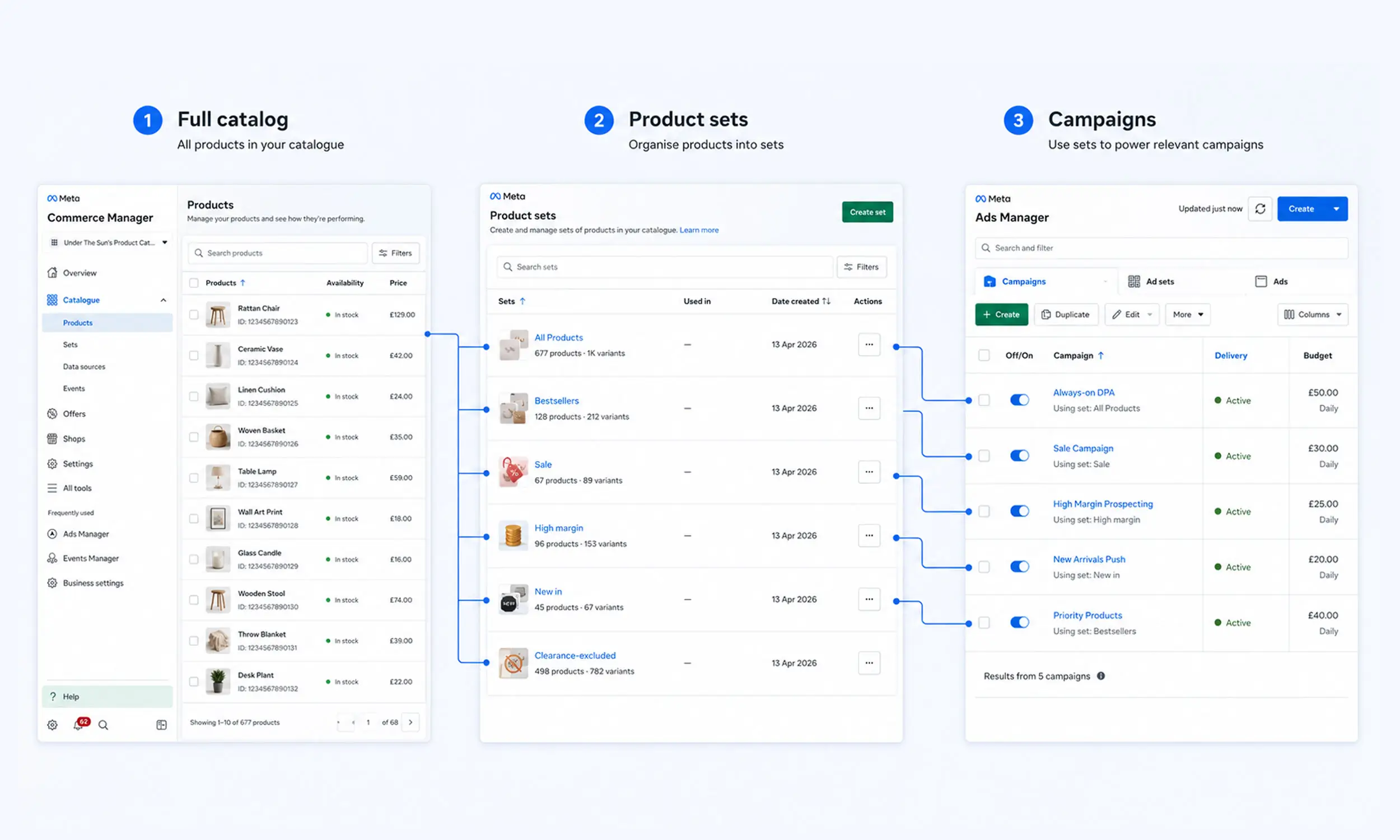
A catalog answers "what can we advertise?" product sets answer the better question: "what should this campaign advertise?" They're the filtering layer between your full catalog and your ad sets - and the difference between one undifferentiated "all products" campaign and a catalog strategy with margins, seasons, and priorities built in.
Product sets can be easy to overlook because they look like a settings detail. This guide treats them as what they are: an eligibility and segmentation layer you control. The catalog mechanics live in Commerce Manager; the campaign side in dynamic product ads.
What product sets are
A product set is a saved filter over your catalog: conditions on fields like category, price, brand, availability, or labels. Sets are dynamic - products enter and leave as their data changes, with no one editing anything.
That dynamism is the entire point. A "Sale items" set defined as sale_price exists fills itself when your feed's sale fields populate and empties itself when the promotion ends. Campaigns pointed at the set stay correct through the whole lifecycle.
Sets are built in Commerce Manager under Catalog → Sets. A catalog campaign selects an eligible product set; an all-products set can serve as the broad default.
The filters you have to work with
Set conditions can reference most catalog fields:
Category fields -
product_type,google_product_categoryPrice - bands, thresholds
Brand, condition, availability
Custom labels -
custom_label_0throughcustom_label_4Internal label -
internal_label
The last two deserve the distinction Meta itself now draws: filter sets with internal_label, not custom labels. Editing custom-label values re-triggers policy review on affected products, which can pause their delivery mid-campaign - a painful price for changing a segmentation tag. Internal labels exist precisely to carry volatile, ads-only segmentation without that side effect. Keep custom_label_* for stable values you might render in creative; put everything you'll re-shuffle in internal_label.
The labels themselves should come from feed rules, not manual tagging: margin bands computed from cost fields, bestseller flags from sales data, season tags from category logic. Rules keep labels true; sets keep campaigns pointed at them.
Set structures that earn their keep
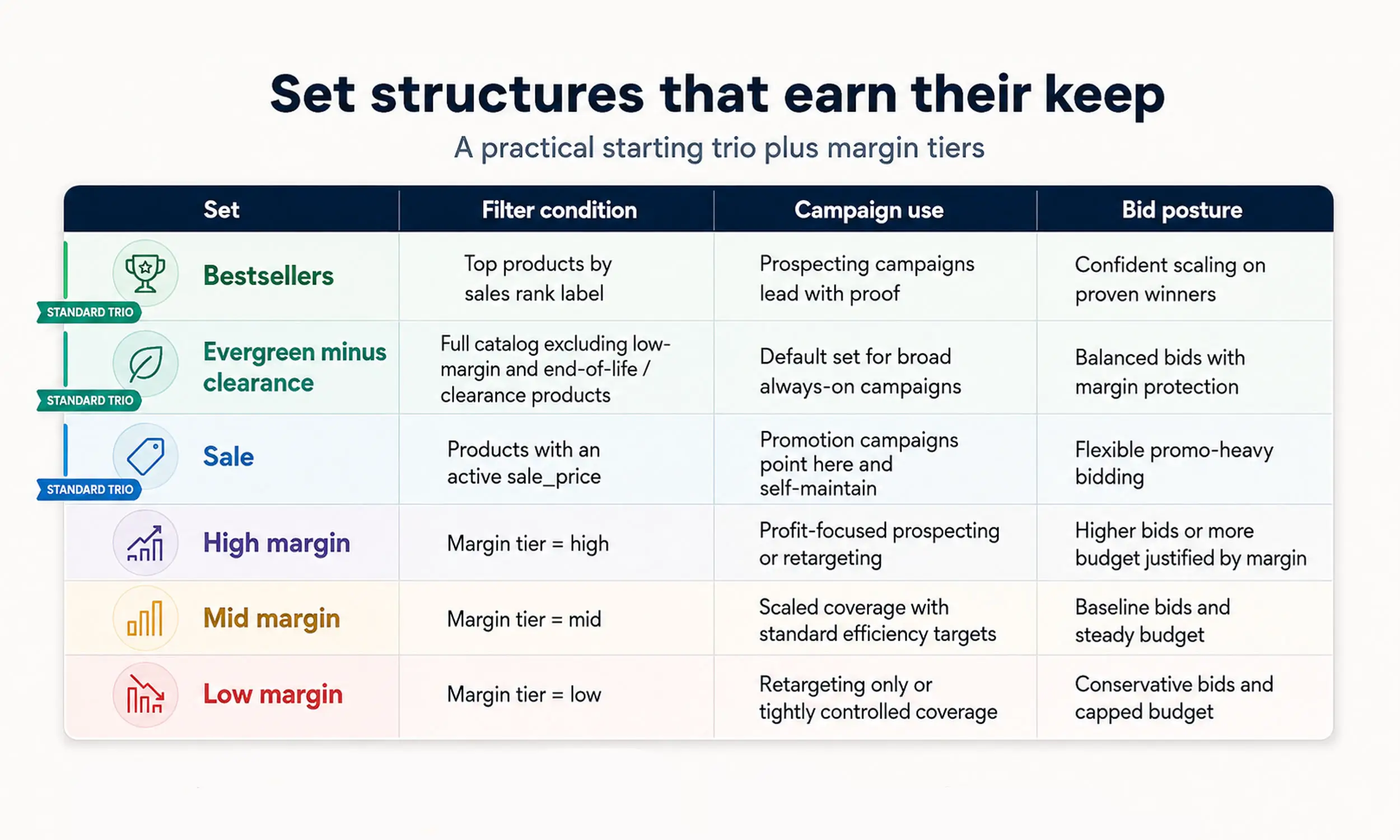
A practical starting trio to evaluate:
Bestsellers - top products by sales rank label. Prospecting campaigns lead with proof.
Evergreen minus clearance - the full catalog with low-margin and end-of-life products excluded. This can be the default set for broad campaigns when those exclusions match the business objective.
Sale - products with an active
sale_price. Promotion campaigns point here and self-maintain.
Beyond the trio, the structures that map to real decisions:
Margin tiers - high/mid/low margin sets with different bid strategies or budgets; you're optimizing profit, not just ROAS
New arrivals - a created-date or label-driven set that gives launches deliberate budget instead of letting them sink in the catalog
Category sets - when categories genuinely differ in economics or seasonality, not just taxonomy
Price bands - premium vs entry sets, useful when audiences split by intent
And the mirror image: exclusion thinking. A set that keeps clearance out of prospecting often does more for blended margin than any positive segmentation.
Moeto Detstvo ran promotional creatives across 15+ collections and 400+ products on exactly this logic - collection-level groupings, each with its own creative treatment, all maintained by data rather than by hand.
Sets and Advantage+ campaigns
Automation hasn't made sets less relevant - it's made them the remaining control. In the consolidated Advantage+ setup, audience and placement decisions increasingly belong to delivery; the product set is where you still express strategy: what's eligible, what's excluded, what gets its own budget.
Practical guidance:
Give broad Advantage+ campaigns a wide set (evergreen minus clearance) - the system personalizes within it
Reserve narrow sets (sale, launches, margin tiers) for campaigns with a specific job
Don't over-fragment without evidence: compare a small number of decision-relevant sets with narrower segmentation, and watch whether budget and conversion volume become too thin
Keeping sets healthy
Sets fail quietly when their inputs drift:
A label rule stops matching (renamed category, changed margin data) and a set silently shrinks
A set's condition references label values that no longer exist
Sale sets outlive the promotion because
sale_pricevalues linger in the feed
Add a set check to your feed audit: product counts per set, reviewed monthly. A set whose count halved isn't strategy - it's a broken rule upstream.
Connecting catalog groups to Meta product sets
The set strategy in this guide begins upstream, where products acquire the labels and groupings Meta will filter. Flow uses collections to organize catalog products and apply different templates or creative strategies to those groups.
Treat a Flow collection and a Meta product set as related definitions, not automatically identical objects. Map the rule deliberately, then compare membership counts after feed updates so a renamed label or changed source value does not quietly alter campaign eligibility.
FAQ
What is a product set in Meta?
A saved, dynamic filter over your catalog - by category, price, labels, or availability - that campaigns promote. Products enter and leave automatically as their data changes.
How many product sets should I have?
A handful with jobs: bestsellers, evergreen-minus-clearance, sale, plus whatever maps to real economic differences (margin tiers, launches). Over-fragmenting splits budget and learning.
Custom labels or internal labels for sets?
Internal labels, per Meta's own recommendation - editing custom labels re-triggers policy review on the products, which can pause delivery. Use custom labels only for stable values.
Do product sets work with Advantage+ campaigns?
Yes - the set defines what's eligible, and it's the main strategic control left in automated campaigns. Wide sets for broad automation, narrow sets for specific jobs.
Why did my product set shrink?
Often an upstream data change: a label rule that stopped matching, changed values, or a filter edit. Check the rule, source values, and set definition before rebuilding it.
Final thoughts
Product sets are where catalog advertising stops being "promote everything" and starts encoding what you actually believe: which products deserve budget, which margins deserve protection, which moments deserve their own creative. The mechanics take an afternoon; the discipline - labels from rules, sets with jobs, counts that get checked - is what compounds.
Segment like it's strategy, because on Meta's increasingly automated campaigns, it's most of the strategy you have left.


Join The Newsletter
Stay ahead in catalog advertising
Get practical guides, product updates, new templates, and best practices for Dynamic Product Ads, creative automation, and ecommerce marketing.
On this page
Related articles



Launch catalog ads with ease
Ready to launch better catalog ads?
Turn product catalogs into publishing-ready creatives in minutes.