Your store's product data was written for product pages, by people who were never told it would someday feed four ad platforms. Titles run long, brand columns sit empty, categories follow your logic instead of the platforms' taxonomy - and none of it is anyone's fault, because the store is the wrong place to fix it.
Feed rules are the right place: transformations that run between your store and each platform's output, correcting and enriching data on the way through. The store stays untouched, the platform teams get spec-compliant feeds, and the fixes apply to every product at once - including ones you haven't added yet.
This guide covers how rules work and, more usefully, the ten recipes that solve the problems every catalog actually has. The workflow context is in product feed management.
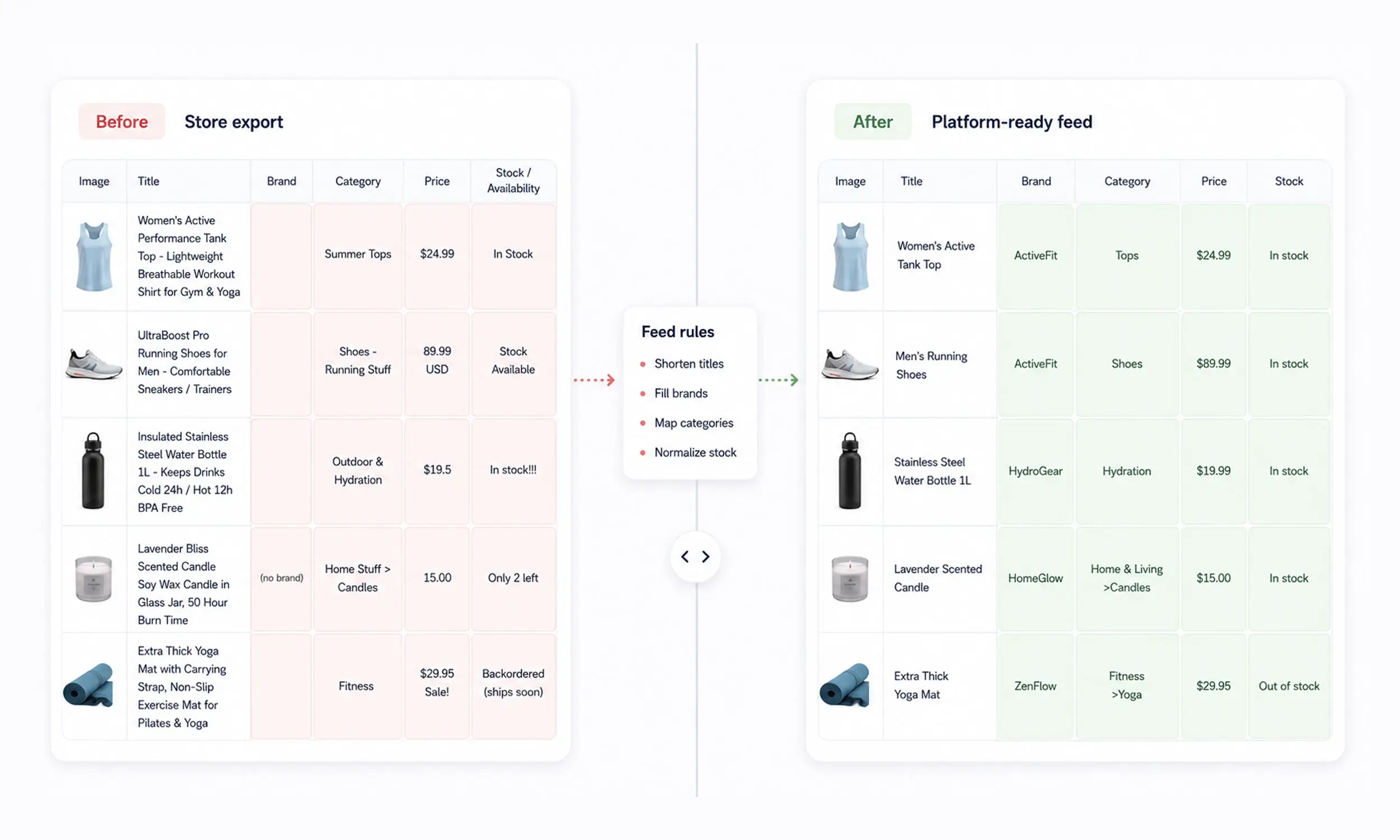
How feed rules work
A feed rule is a condition plus a transformation, applied per product at feed generation:
If a field is empty → fill it from another field or a default
If a value matches a pattern → rewrite, truncate, or normalize it
If product data meets a condition → set a label, category, or availability value
Ten rules worth copying
1. The title formula
Brand + Product Name + Key Attribute, truncated at 65 characters so Meta doesn't cut it mid-word. Front-loads what buyers scan for, standardizes the whole catalog in one pass. Keep the full title for platforms that display more.
2. The brand backfill
If brand is empty → fill from your vendor field; if that's empty → default to your store brand. An empty brand column is a Meta rejection and a matching penalty everywhere else; this rule retires the problem permanently.
3. The category mapper
Map your product_type values to google_product_category - the taxonomy Meta, TikTok, and Pinterest all use. Build the mapping once per category, 2-3 levels deep; every product inherits it.
4. The availability threshold
in stock only when inventory is above a buffer (say, 3 units), not merely above zero. Stops ads sending five buyers to the last unit, and absorbs inventory-sync lag before it becomes an oversell.
5. The sale price guard
Populate sale_price only when it is genuinely below price. Add sale_price_effective_date when the promotion has a scheduled window; use an open-ended sale only where the destination permits it and the landing page shows the same price.
6. The text sanitizer
Strip HTML tags, emojis, control characters, and ALL-CAPS from titles and descriptions. Meta rejects HTML and shouting; TikTok rejects emojis outright. One rule, every text field, zero rejections from copy-paste artifacts.
7. The margin labeler
Compute margin band from price and cost, write it to internal_label (on Meta - volatile labels belong there, not in custom labels). This is the rule that unlocks margin-tiered product sets and profit-aware bidding.
8. The bestseller flag
Top N products by sales rank get a bestseller label, refreshed on every generation. Prospecting sets built on it stay current without anyone curating a list.
9. The season tagger
Category- or attribute-driven season labels (summer, holiday, evergreen). Come campaign time, the seasonal set and its creative treatment are already addressable.
10. The image fallback
If additional_image_link is empty → leave it empty and route the product to an enrichment queue; duplicating the main image adds no new buyer information. If the main image fails your size check → route the product to a fix list instead of the feed. Do not publish an asset that fails the destination's image requirements.
Rule | Condition → transformation |
|---|---|
Title formula |
|
Brand backfill |
|
Category mapper |
|
Availability threshold |
|
Sale price guard |
|
Text sanitizer |
|
Margin labeler |
|
Bestseller flag |
|
Season tagger |
|
Image fallback |
|
Rules to refuse
Two anti-patterns worth naming:
Rules that lie - inflating availability, masking prices, "optimizing" titles into keyword salads. Platforms crawl landing pages; every dishonest rule is a mismatch disapproval on a timer.
Rules that hide broken sources - if half your catalog needs a brand backfill, the backfill is triage, and the store data deserves a real fix. Rules patch the last mile; they shouldn't become load-bearing fiction.
Testing and maintaining rules
Preview before publish: run the rule, diff the output against the previous feed, check the changed-row count matches your expectation
One change per deploy: stacked rule edits make regressions unattributable
Putting feed rules into the publishing pipeline
Feed rules are most useful when they live in the pipeline rather than in a spreadsheet someone reruns by hand. Flow's catalog engine provides the mapping and validation layer between source data and channel output, while the creative studio can reuse supported product fields inside templates and variations.
Implement only the rules your current workspace supports, preview the changed rows, and diff the output before publishing. A rule should make the catalog more truthful and maintainable; it should never hide a broken source.
FAQ
What are product feed rules?
Automated transformations applied between your store data and each platform's feed output - filling gaps, normalizing formats, mapping categories, and generating labels, without editing the store.
What's the first feed rule I should set up?
Start with the rule that addresses the largest validated error class in your diagnostics. Title formulas and brand backfills are useful when truncation or missing brand values are present across many products.
Can feed rules change prices?
They can format prices and manage sale_price logic, but never misrepresent them - platforms crawl your landing pages, and price mismatches disapprove products and can escalate to account suspension.
Do rules replace fixing my store data?
They complement it. Rules handle platform-specific formatting the store shouldn't care about; genuinely missing or wrong source data still deserves a fix at the source.
How do labels from rules get used?
They power product sets and campaign segmentation - margin tiers, bestsellers, seasons - and, in a template system, they can select which creative treatment each product renders with.
Final thoughts
Feed rules are leverage in its purest form: a condition written once, applied to every product forever. The ten recipes here cover most of what any catalog needs - clean titles, filled fields, honest availability, self-managing sales, and labels that make segmentation real.
Write them, preview them, and let the pipeline enforce what used to be a wiki page nobody read.


Join The Newsletter
Stay ahead in catalog advertising
Get practical guides, product updates, new templates, and best practices for Dynamic Product Ads, creative automation, and ecommerce marketing.
On this page
Related articles



Launch catalog ads with ease
Ready to launch better catalog ads?
Turn product catalogs into publishing-ready creatives in minutes.