Before reaching for any creative tooling, every catalog advertiser should know what Meta gives away for free: a frame feature that wraps your product images in a branded border, and dynamic overlays that stamp prices and discounts onto ads straight from the feed. Both live in Ads Manager, both take minutes to enable, and both are genuinely useful.
They also have hard, documented limits - placement restrictions, character caps, fixed styling menus - that explain why enriched catalog creative exists as a category. This guide lays out both tools honestly, then gives you a decision framework: when native is enough, and when templates earn their keep.
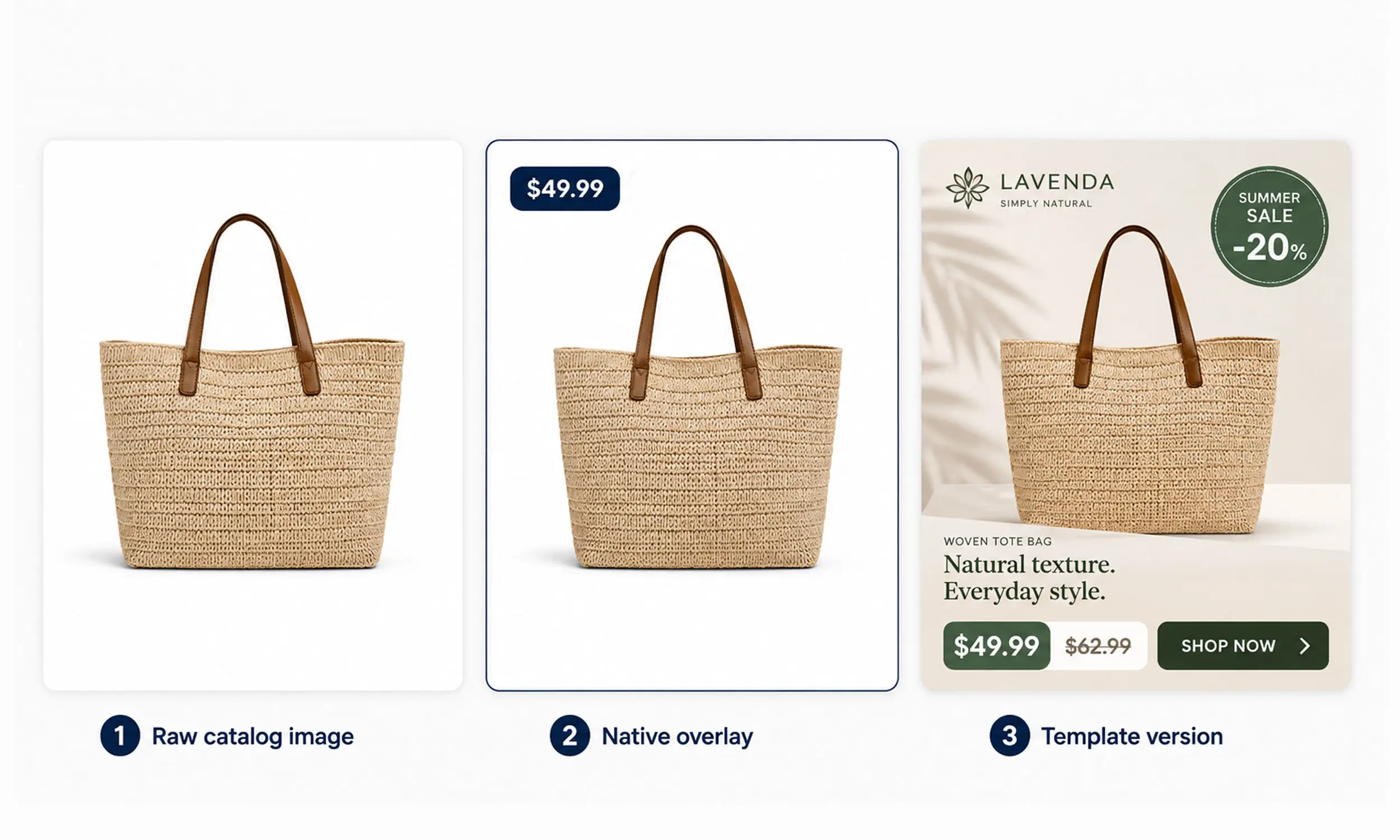
What frames actually do
Meta's "Add a frame" option overlays a static graphic - a border or your logo - onto catalog images at the ad level. You upload a custom 1:1 image (at least 1080 x 1080, under 1 MB) and adjust three things: opacity, size, and position.
The documented constraints:
Not available on Instagram placements - Meta states this outright
One static graphic for every product in the ad - no per-product variation
Meta itself advises transparent backgrounds and no text on the frame "to maximize delivery"
Frames are a brand wrapper, and within that job they're fine: a consistent border that makes your carousel recognizable on Facebook costs nothing and ships today.
What dynamic overlays actually do
Dynamic overlays are the more interesting tool: they render live catalog data - price, strikethrough price, percentage off, or free shipping - as a label on your ad media, automatically or manually configured, in single image/video or carousel formats.
The styling system is a set of fixed menus:
Four banner shapes: rectangle, pill, circle, triangle
Position, banner color, text color, opacity, and a font picker
Character limits including currency symbols and spaces: 13 characters for rectangle and pill, 6 for circle and triangle - and strikethrough mode needs both prices within 6 characters each
And the big one, stated plainly in Meta's doc: dynamic overlays only show on Facebook Feed. Instagram, Reels, Stories, Audience Network - no overlay renders there. (A companion feature, product info in ad copy, can at least put prices in the text layer everywhere.)
Overlays also interact with Meta's automation: they're listed among Advantage+ creative enhancements, "Always show" overrides the automation, and if you use background generation, Meta may restyle the overlay's font, color, and layout to match its generated background - worth knowing if brand consistency matters to you.
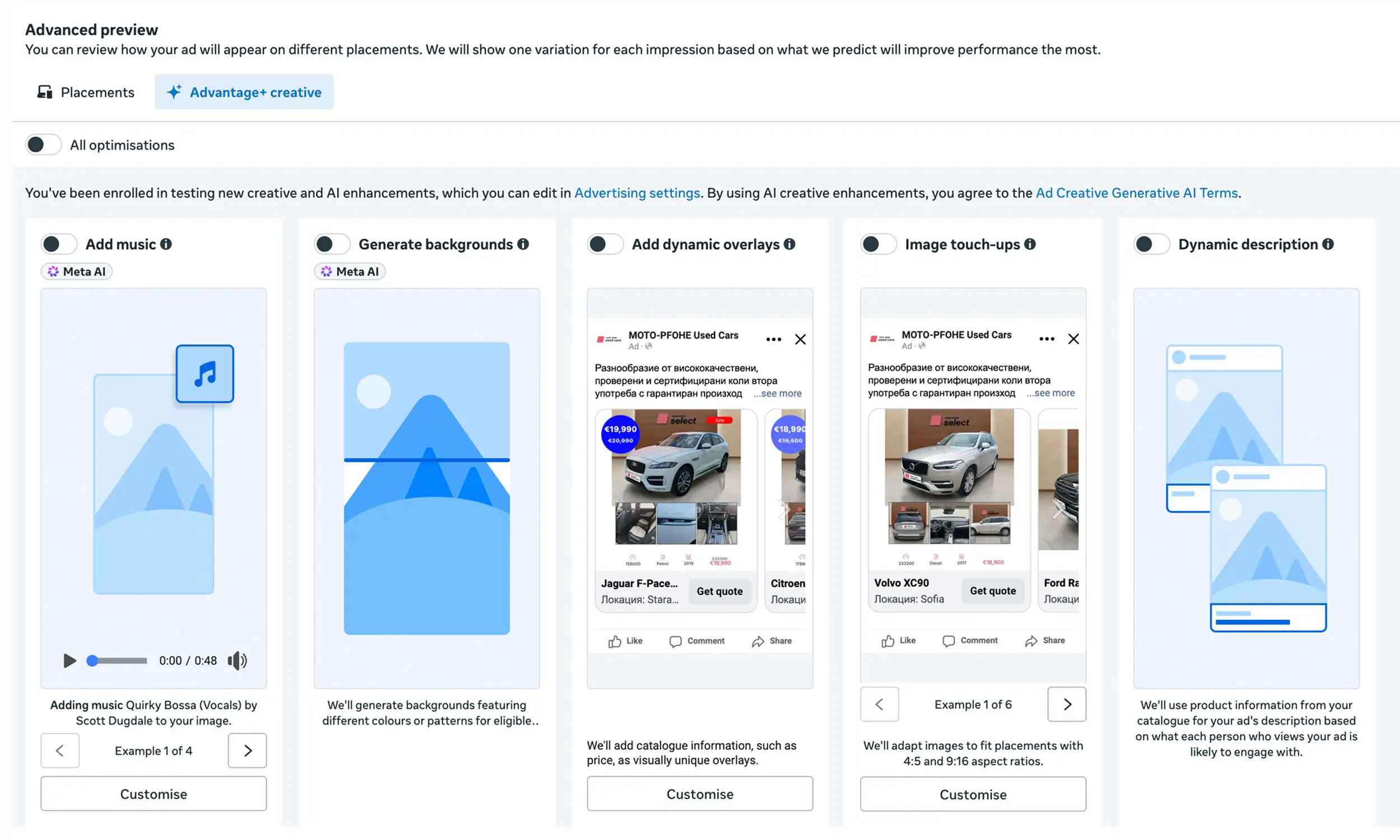
The honest comparison
Set side by side, the two approaches split cleanly on five dimensions:
Placement coverage. Native tools decorate Facebook Feed (overlays) and Facebook placements (frames). Template-rendered creative travels with the image itself - Instagram, Reels, Stories, and every other platform your catalog feeds, TikTok and Pinterest included.
Design freedom. Native gives four banner shapes, menu fonts, and one static frame graphic. Templates give a design system: brand typography, badges beyond the four data types, seasonal backgrounds, per-collection treatments, product cutouts.
Data expressiveness. Overlays render exactly four values (price, strikethrough, percent off, free shipping) within tight character caps - a longer price in some currencies won't fit a triangle or circle. Templates render any feed field with layout that accommodates it: labels, ratings, campaign text, computed values.
Effort and cost. Native wins outright: minutes to enable, free, no pipeline. Templates need a design pass and a rendering workflow before the first ad improves.
Consistency and control. Native styling lives per-ad in Ads Manager and can be adjusted by Meta's automation. Rendered creative is deterministic - what the template defines is what serves, everywhere, and rotating it is a controlled, testable act.
Which to use when
Use the native tools when:
You're starting out and want prices visible on Facebook Feed this week
Facebook Feed is genuinely your dominant placement
The four data types and fixed styles cover your needs
There's no design capacity yet - a clean overlay beats a raw image
Move to templates when any of these become true:
Instagram, Reels, or Stories matter - the native decorations simply don't render there, and those placements punish raw catalog images hardest
You run more than one platform - the same rendered creative serves Meta, TikTok, Pinterest, and Snapchat; native tools stop at Meta's border
Brand consistency is a requirement, not a preference - your fonts, your badge system, no automation restyling
Promotions are a rhythm - seasonal treatments, sale takeovers, and creative rotation all want the template layer
Prices and offers overflow the character caps, or you need labels the four data types can't express
And use both where it's sensible: many stores run template-rendered creative as the base with the ad-copy product info feature on top. The tools aren't rivals so much as different layers - native decorates ads; templates produce creative.
Where Flow sits in this decision
Flow is the template side of this comparison, built for the cases native tools can't reach: reusable templates carrying brand typography, price and badge layers, backgrounds, and per-collection treatments, rendered into the images themselves - so the creative survives every placement and platform, renders identically wherever it serves, and changes on your schedule rather than an automation's.
If your growth path includes Instagram, a second platform, or a real promotional calendar, that's the fork where templates stop being optional.
FAQ
Are Meta's frames and overlays free?
Yes - both are built into Ads Manager at no cost, configured at the ad level. That's their strongest argument, and for Facebook-Feed-centric advertisers it's a real one.
Why don't my overlays show on Instagram?
on Instagram placements. Creative rendered into the image itself is the only decoration that travels everywhere.
What data can dynamic overlays display?
Four types: price, strikethrough price, percentage off, and free shipping - within character limits (13 for rectangle/pill, 6 for circle/triangle, currency symbol included).
Can Meta change how my overlays look?
Within its automation, yes - overlays are an Advantage+ creative enhancement, and with background generation Meta may adjust the overlay's font, color, and layout. "Always show" pins the overlay on Facebook Feed but doesn't extend it to other placements.
Should I use overlays and templates together?
Rendered template creative plus the product-info-in-ad-copy feature is a sensible stack. Adding native overlays on top of already-designed images usually duplicates the price display - pick one layer for each job.
Final thoughts
Meta's native tools are the right first step and the wrong final answer: free, fast, and fenced into Facebook Feed with fixed styles and four data types. Templates cost setup effort and buy you the rest - every placement, every platform, your brand system, your rotation schedule.
Start native if you're starting. Upgrade the moment your ads live anywhere Facebook Feed ends - because that's exactly where the built-in decorations stop.


Join The Newsletter
Stay ahead in catalog advertising
Get practical guides, product updates, new templates, and best practices for Dynamic Product Ads, creative automation, and ecommerce marketing.
On this page
Related articles



Launch catalog ads with ease
Ready to launch better catalog ads?
Turn product catalogs into publishing-ready creatives in minutes.