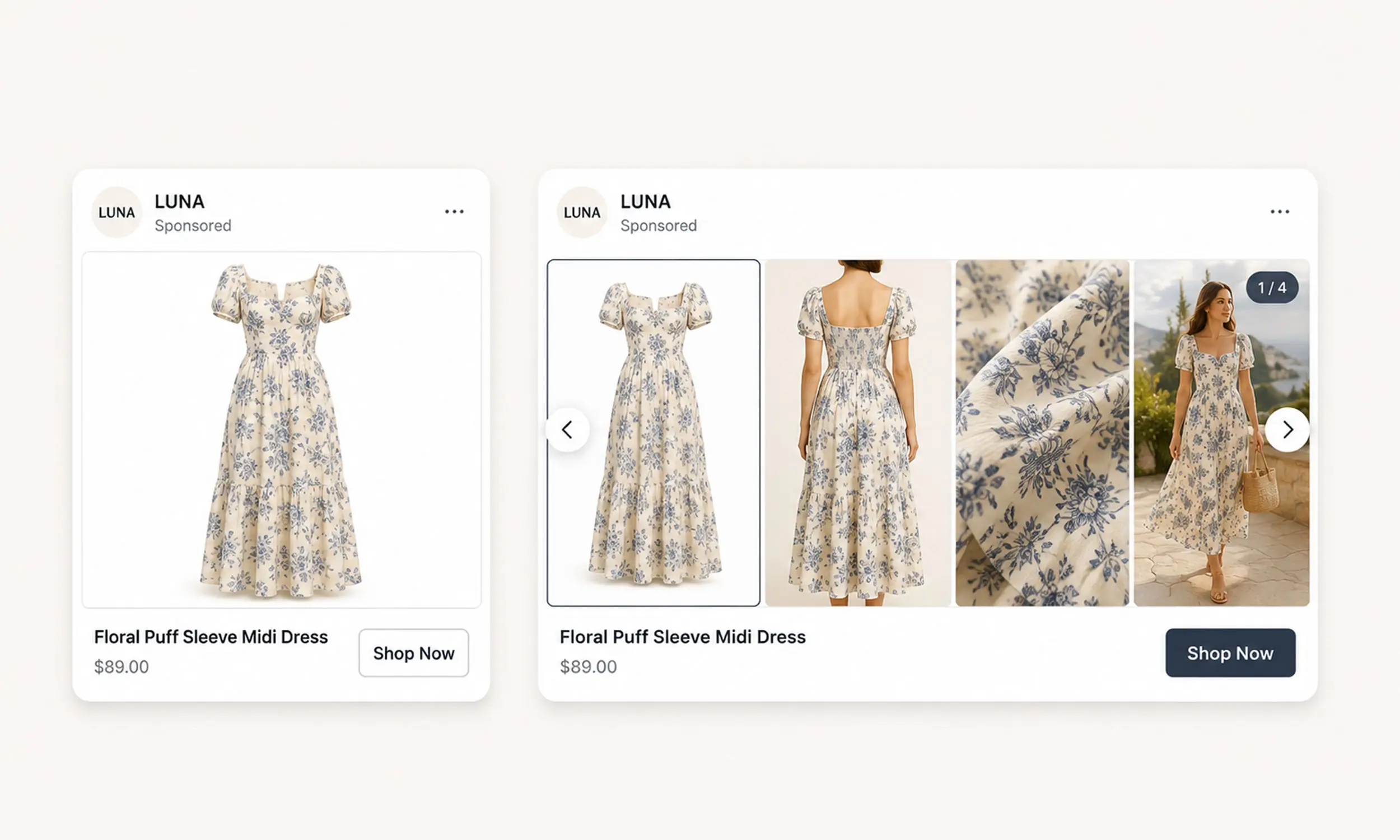
You've seen it in your own feed: a catalog carousel where each product card cycles through images - the dress from the front, the back, the fabric close-up, then worn on a person. It reads as premium, big-brand advertising, and most advertisers assume it's some enterprise feature or hand-built creative.
It isn't. It's a standard Advantage+ catalog ads option called slideshow, driven by a feed field every store has access to - additional_image_link - and gated by one eligibility rule most catalogs simply don't meet, because they ship one image per product.
This guide covers the mechanism, the exact requirements, the setup path, and the honest limitations - plus the adjacent video option that works on the same principle.
The mechanism: one feed field, one ad option
Two pieces make the effect work:
The data:
additional_image_link. Meta's catalog spec accepts up to 20 additional images per product, with the same requirements as the main image - JPEG or PNG, at least 500 x 500 pixels, under 8 MB. This is where the extra angles live.The ad option: slideshow. In carousel-format Advantage+ catalog ads, Meta offers a slideshow option that "combines multiple images or videos" into the cycling card - the exact effect you've seen from the big advertisers.
No special account status, no enterprise tier. The brands that have it simply feed multiple images per product; the stores that don't, don't.
The eligibility rule that filters most catalogs out
Meta's documented threshold: to use slideshow, you need multiple images for at least 100 items, or at least 20% of the items, in your product set.
That single line explains the big-brand skew. It's not that Meta reserves the feature - it's that qualifying requires image depth across the catalog, and most feeds ship exactly one photo per product. The moment your feed carries real image coverage, the option exists for you too.
Worth noting the threshold applies per product set - a curated set of your best-photographed products can qualify even when the full catalog doesn't. That's the practical entry point: build a "rich media" set first, expand coverage over time.
Setting it up
The path in Ads Manager, per Meta's help page:
Sales objective, carousel format, filled dynamically from a product set
Deselect "Advantage+ creative for catalog" (the slideshow option lives in the manual creative path)
Under carousel card creative options, choose "Show a slideshow when available"
"When available" is the operative phrase: products with multiple images cycle; products with one image render as normal static cards. Nothing breaks - the feature degrades gracefully per product.
One placement limitation to know before you judge results: slideshow plays on Facebook feeds (phone, tablet, desktop); on Instagram and Audience Network the same items appear as static images. Check performance with a placement breakdown, not campaign totals.
What images to feed it
Meta's own guidance for products headed to slideshow: 4 or more images, mixing angles, close-ups, and lifestyle shots - clean backdrops, no overlaid text on the base images.
Two production rules from the same spec page:
Keep every image in one aspect ratio - 1:1 or 4:5 - because mixed-ratio sets may be automatically adjusted in carousel format
Treat the image sequence as a story: what does frame two answer that frame one raised? Front → detail → in-use is the pattern that maps to how people actually evaluate products
The gap between having this feature and using it well is the same gap as everywhere in catalog advertising: data coverage first, then creative intent.
The video sibling: product videos in cards
The same architecture extends to video. The feed's video[0].url through video[19].url fields carry product-level videos (direct file links, 4:5 recommended for the default, 200 MB cap via feed), and Ads Manager's "Allow product video" option - on by default for Advantage+ catalog ads - shows each person images or video based on predicted response.
Meta has pushed this further with Dynamic Media, which since late 2025 defaults to on: carousel and collection ads can swap hero media to video automatically where it's likely to improve results. Two details from the docs worth knowing: product thumbnails in pre-click experiences stay images, and feed-delivered videos may not be fetched until the product enters an active campaign - so a missing video in preview isn't necessarily a broken feed.

Filling 20 image slots without 20 photoshoots
Here's where the feature meets reality: the threshold asks for image depth, and photography budgets are finite. The scalable answer is the same one behind enriched catalog ads - rendered variants.
From one good product image, a template system can generate legitimate additional views: the product on a brand-color background, in a lifestyle-textured scene, with a detail crop, in a seasonal treatment. Each is a real, distinct image serving the slideshow's actual job - giving the viewer more ways to see the product - without a second shoot.
In Flow, those variants come from the templates you already maintain: background swaps, crops, and treatment variations rendered per product and written to the feed's additional image slots. The photography you have becomes the image coverage the threshold wants - and the slideshow option stops being a big-brand tell.
FAQ
How do catalog ads show multiple images per product?
Through Meta's slideshow option in carousel-format Advantage+ catalog ads, which cycles through the images in each product's additional_image_link feed field (up to 20 per product).
Why don't I see the slideshow option for my catalog?
Check the eligibility rule: your product set needs multiple images for at least 100 items or 20% of items. Single-image feeds don't qualify - fill additional images first.
Does the slideshow work on Instagram?
No - it plays on Facebook feeds; Instagram and Audience Network render the items as static images. Judge it with placement breakdowns.
How many images should each product have?
Meta recommends 4 or more for slideshow use - mixed angles, close-ups, and lifestyle, all in one consistent ratio (1:1 or 4:5).
Can the cards show video instead?
Yes - product videos from the feed's video fields, with "Allow product video" on by default and Dynamic Media able to swap hero media to video automatically. Thumbnails remain images.
Final thoughts
The multi-image catalog card isn't a big-brand privilege - it's a data threshold. Meta built the feature for any catalog with real image coverage; most stores just never fill the slots. Populate additional_image_link with genuine variety (shot or rendered), qualify a product set, flip the option on, and the ad that used to signal "enterprise advertiser" starts signaling you.


Join The Newsletter
Stay ahead in catalog advertising
Get practical guides, product updates, new templates, and best practices for Dynamic Product Ads, creative automation, and ecommerce marketing.
On this page
Related articles



Launch catalog ads with ease
Ready to launch better catalog ads?
Turn product catalogs into publishing-ready creatives in minutes.